Καθαρή είσοδος SVG
Κατάλληλο για έργα τέχνης βασισμένα σε διαδρομές, λογότυπα, ετικέτες, διαγράμματα και σχέδια SVG. Ζωντανό κείμενο, εικόνες raster, μάσκες, φίλτρα, διαβαθμίσεις και σύνθετα εφέ πρέπει να ισοπεδωθούν πριν από τη μεταφόρτωση.
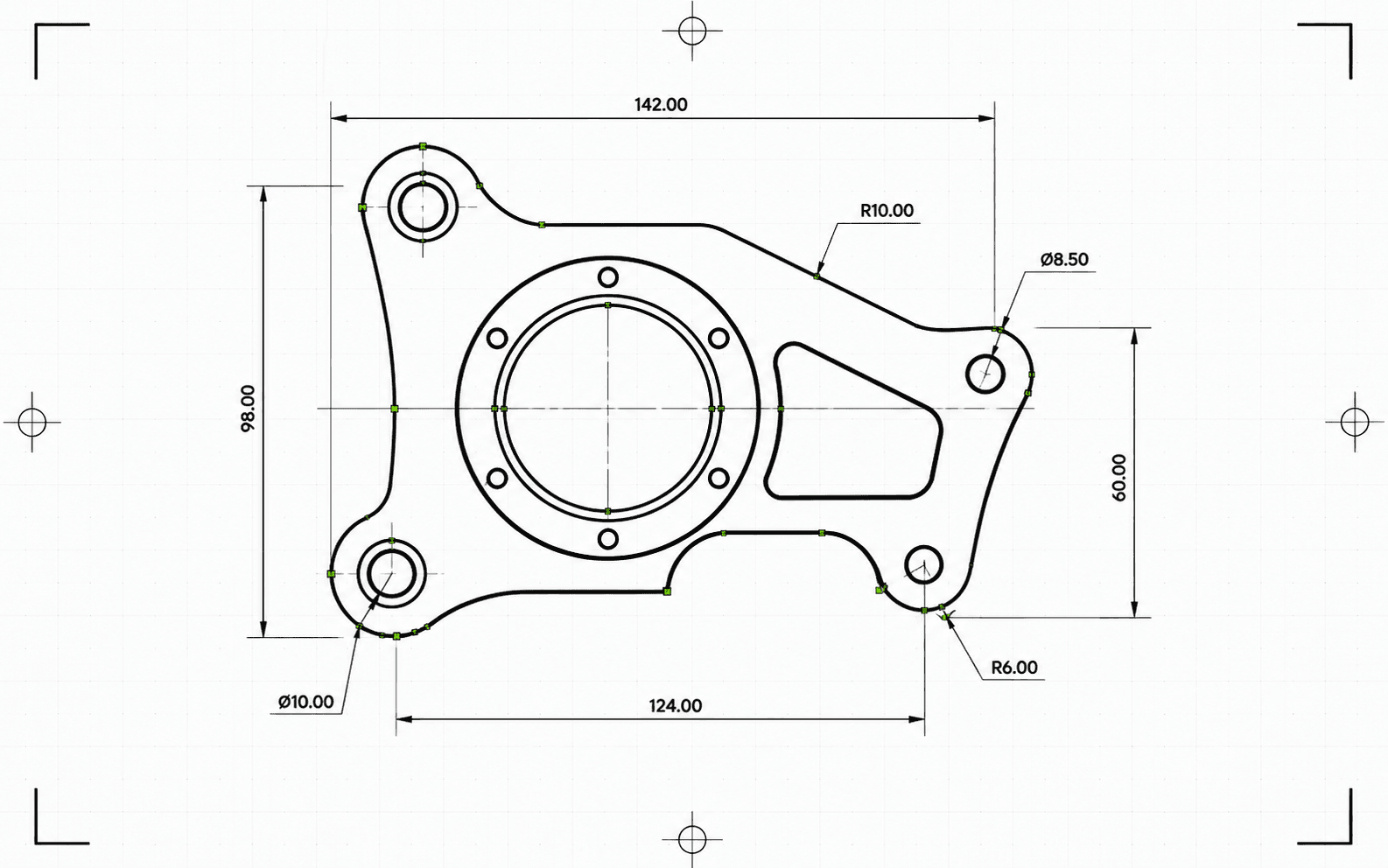
Το Pixel2Lines μετατρέπει αρχεία SVG βασισμένα σε διαδρομές σε DXF R2010 σε χιλιοστά. Οι καμπύλες Bezier ελέγχονται σε σχέση με κυκλική ανοχή και εγγράφονται ως αληθινές οντότητες τόξου όπου η προσαρμογή επιτυγχάνει — αντί να ισοπεδώνονται σε τμήματα πολυγραμμής. Τα χρώματα SVG αντιστοιχίζονται σε επίπεδα DXF: κόκκινες διαδρομές σε Cut, μπλε σε Score, πράσινες σε Engrave. Μαύρες και αχρωματικές διαδρομές προεπιλέγουν σε Cut. Σημασιολογικά αναγνωριστικά ομάδας (CUT_HOLES, CUT_OUTER, DETAIL) διατηρούνται ως ακριβή ονόματα επιπέδων DXF. Η γεωμετρία εκκαθαρίζεται πριν από την εγγραφή: μικρά τμήματα, διπλές οντότητες και ανοιχτές διαδρομές με μικρά κενά επιλύονται αυτόματα.
Πριν από τη μετατροπή, ο αγωγός επικυρώνει το SVG: τα ζωντανά κείμενα αποκλείουν την εργασία με συγκεκριμένο σφάλμα, και τα SVG χωρίς ρητές φυσικές διαστάσεις αποκλείονται αντί να κλιμακώνονται σιωπηλά. Διαβαθμίσεις, μάσκες, φίλτρα και διαδρομές αποκοπής παραλείπονται με προειδοποιήσεις — πρέπει να ισοπεδωθούν στον επεξεργαστή SVG πριν από τη μεταφόρτωση. Λαμβάνετε ένα αρχείο DXF και μια αναφορά JSON με κατάσταση, εμπόδια, προειδοποιήσεις, επιβεβαιωμένες διαστάσεις, πλήθη οντοτήτων ανά επίπεδο, ενέργειες εκκαθάρισης, μέγεθος αρχείου και αθροίσματα ελέγχου.
Μετατρέψτε αρχεία SVG βασισμένα σε διαδρομές σε DXF R2010 σε χιλιοστά με επαληθευμένη κλίμακα, γεωμετρία ακριβείας τόξων και αναφορά JSON για κάθε μετατροπή.
Κατάλληλο για έργα τέχνης βασισμένα σε διαδρομές, λογότυπα, ετικέτες, διαγράμματα και σχέδια SVG. Ζωντανό κείμενο, εικόνες raster, μάσκες, φίλτρα, διαβαθμίσεις και σύνθετα εφέ πρέπει να ισοπεδωθούν πριν από τη μεταφόρτωση.
Οι φυσικές διαστάσεις αντιμετωπίζονται ως απαίτηση. Τα SVG με ρητό πλάτος και ύψος σε mm, cm ή ίντσες μετατρέπονται στο δηλωμένο μέγεθός τους. Τα SVG με μόνο ViewBox χωρίς φυσικές μονάδες αποκλείονται — το DXF δεν παράγεται σε μη επαληθευμένη κλίμακα. Το αρχείο DXF εξόδου δηλώνει χιλιοστά στην κεφαλίδα του ($INSUNITS=4).
Οι καμπύλες Bezier προσαρμόζονται σε κύκλο χρησιμοποιώντας δειγματοληψία 5 σημείων με ανοχή 0,01 mm. Καμπύλες που επιτυγχάνουν την προσαρμογή εγγράφονται ως οντότητες ARC· οι υπόλοιπες προσεγγίζονται ως τμήματα γραμμής με την ίδια ανοχή. Μετά την εγγραφή, το DXF επικυρώνεται: κεφαλίδα μονάδων, πεπερασμένη έκταση, πλήθη οντοτήτων και εγκυρότητα συντεταγμένων. Η έξοδος είναι μορφή R2010, αναγνώσιμη από AutoCAD, LightBurn, RDWorks, Fusion 360 και τυπικό λογισμικό CAM.
Κατεβάστε το επικυρωμένο αρχείο DXF και μια αναφορά JSON με κατάσταση, προειδοποιήσεις, εμπόδια, διαστάσεις, αναθέσεις επιπέδων, πλήθη οντοτήτων, σημειώσεις εκκαθάρισης, μεγέθη σε bytes και αθροίσματα ελέγχου. Οι οντότητες στο DXF διατάσσονται για κοπή: εσωτερικά σχήματα πριν από εξωτερικά περιγράμματα, ώστε οι εσωτερικές εκκοπές να ολοκληρώνονται πριν ελευθερωθεί το περιβάλλον υλικό.
Εστιάζει στην αξιόπιστη μετατροπή γεωμετρίας 2D SVG σε DXF για CAD, λογισμικό λέιζερ και παράδοση CAM. Εικόνες raster, ζωντανό κείμενο, μάσκες, φίλτρα, διαβαθμίσεις και σύνθετα οπτικά εφέ πρέπει να ισοπεδωθούν πρώτα. Η δημιουργία τροχιών εργαλείου CNC και οι λειτουργίες CAM δρομολογητή δεν συμπεριλαμβάνονται.
Έξοδος DXF R2010 σε χιλιοστά για εισαγωγή CAD, λογισμικό λέιζερ, παράδοση CAM και αρχειοθέτηση διανυσμάτων.
Δομημένη αναφορά προελέγχου και παράδοσης με κατάσταση, εμπόδια, προειδοποιήσεις, διαστάσεις, επίπεδα, πλήθη οντοτήτων, ενέργειες εκκαθάρισης και αθροίσματα ελέγχου.
Χρησιμοποιήστε SVG με πραγματική διανυσματική γεωμετρία βασισμένη σε διαδρομές. Μετατρέψτε το ζωντανό κείμενο σε περιγράμματα και ισοπεδώστε ενσωματωμένες εικόνες, μάσκες, φίλτρα, διαδρομές αποκοπής, διαβαθμίσεις και άλλα οπτικά εφέ πριν από τη μεταφόρτωση.
Ο μετατροπέας ελέγχει για μη υποστηριζόμενα χαρακτηριστικά SVG, διαφανή ή αόρατη γεωμετρία και ελλείπουσες φυσικές διαστάσεις. Εργασίες που θα παρήγαγαν αναξιόπιστη έξοδο αποκλείονται με συγκεκριμένο σφάλμα πριν εγγραφεί το DXF.
Κατεβάστε ένα επικυρωμένο αρχείο DXF R2010 και μια αναφορά JSON με αθροίσματα ελέγχου, μεγέθη σε bytes και πλήθη οντοτήτων. Προειδοποιήσεις και εμπόδια συμπεριλαμβάνονται στην αναφορά όταν εντοπίστηκαν προβλήματα κατά τη μετατροπή.
Προετοιμάστε λογότυπα, διατάξεις, ετικέτες, σχέδια και διαγράμματα SVG για εφαρμογές CAD που απαιτούν είσοδο DXF.
Μετατρέψτε καθαρές διανυσματικές διαδρομές σε DXF με επίπεδα Cut, Score, Engrave ή σημασιολογικά επίπεδα παραγωγής όπου το SVG τα υποστηρίζει.
Δημιουργήστε αρχείο ανταλλαγής DXF για χρήση σε downstream CAD/CAM. Τροχιές εργαλείου, βάθος Z, αγκράφες, εγκοπές και αντιστάθμιση κοπτήρα παραμένουν στο λογισμικό CAM.
Αποθηκεύστε έργα τέχνης πελατών και σχέδια παραγωγής σε διανυσματική μορφή φιλική προς CAD με τεκμηρίωση προέλευσης βάσει αναφοράς.
Χρησιμοποιήστε χρώμα και υποστηριζόμενη σημασιολογία ομάδων για να οργανώσετε επίπεδα DXF όπως Cut, Score, Engrave, CUT_HOLES, CUT_OUTER και DETAIL.
Εκτελέστε δοκιμαστική μετατροπή για εντοπισμό μη υποστηριζόμενων χαρακτηριστικών, ασαφών διαστάσεων και προβλημάτων γεωμετρίας πριν ξεκινήσετε πλήρη μετατροπή.
Τα καθαρά αρχεία SVG βασισμένα σε διαδρομές λειτουργούν καλύτερα. Ισοπεδώστε ενσωματωμένες εικόνες, ζωντανό κείμενο, μάσκες, φίλτρα, διαβαθμίσεις, διαδρομές αποκοπής, εξωτερικό CSS και μη υποστηριζόμενα εφέ πριν από τη μεταφόρτωση.
Η έξοδος χρησιμοποιεί οντότητες LINE, ARC, CIRCLE και LWPOLYLINE — τύπους υποστηριζόμενους από AutoCAD, LightBurn, RDWorks, Fusion 360 και τους περισσότερους ελεγκτές λέιζερ. Δεν εγγράφονται οντότητες SPLINE, γεγονός που διασφαλίζει συμβατότητα με παλαιότερους ελεγκτές μηχανημάτων. Καμπύλες Bezier που ταιριάζουν με κυκλικό σχήμα εντός 0,01 mm εγγράφονται ως οντότητες ARC· οι υπόλοιπες προσεγγίζονται ως τμήματα γραμμής με την ίδια ανοχή. Πλήρεις κύκλοι εντοπίζονται και εγγράφονται ως οντότητες CIRCLE.
Τα SVG με ρητό πλάτος και ύψος σε mm, cm ή ίντσες μετατρέπονται στις δηλωμένες διαστάσεις τους. Τα SVG βασισμένα σε pixel χρησιμοποιούν από προεπιλογή 96 DPI. Τα SVG με μόνο ViewBox χωρίς ρητές φυσικές μονάδες αποκλείονται — το DXF δεν παραδίδεται σε μη επαληθευμένη κλίμακα.
Λαμβάνετε ένα αρχείο DXF και μια δομημένη αναφορά μετατροπής JSON με κατάσταση, εμπόδια, προειδοποιήσεις, διαστάσεις, πλήθη οντοτήτων και επιπέδων, λεπτομέρειες επικύρωσης, μεγέθη αρχείων και αθροίσματα ελέγχου. Τροχιές εργαλείου CNC, βάθος Z, αγκράφες, εγκοπές, εισόδους, ταχύτητες τροφοδοσίας και αντιστάθμιση κοπτήρα παραμένουν στο λογισμικό CAM.
