Input SVG pulito
Ideale per Vettorializzazione a tratto basati su tracciati, loghi, etichette, contorni e geometria pronta per il disegno. Appiattire testo attivo, sfumature, maschere, immagini incorporate ed effetti complessi prima del caricamento.
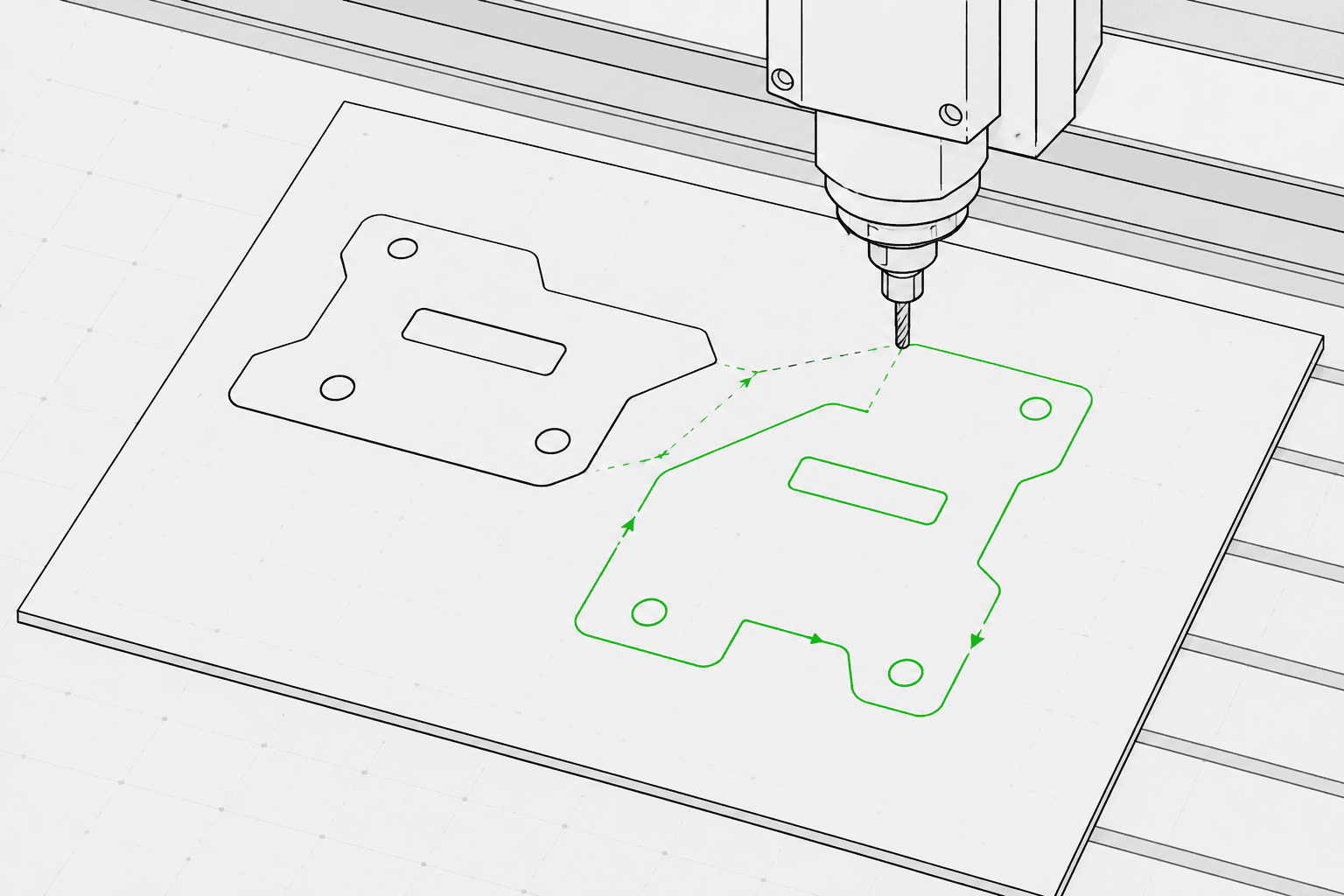
Pixel2Lines converte file SVG basati su tracciati in G-Code per tre profili macchina: laser GRBL, laser generico e plotter a penna. L'output utilizza movimenti rapidi G0 e movimenti di avanzamento G1 — i comandi M3 e M5 controllano la potenza laser tramite il parametro S (0–1000), oppure la posizione della penna tramite template configurabili. È possibile impostare l'intento operativo (incisione a linea, cordonatura, taglio o tracciatura), le dimensioni dell'area di lavoro in mm, la velocità di avanzamento, la velocità in rapido, la percentuale di potenza laser e il numero di passate. Le curve Bezier e gli archi vengono convertiti in segmenti polilineari con una tolleranza configurabile — non vengono emessi comandi arco G2/G3, il che mantiene l'output compatibile con i controller di base e più datati.
Prima di generare il G-Code, la pipeline valida l'SVG: geometria esterna all'area di lavoro configurata, tracciati aperti destinati a operazioni di taglio e SVG privi di geometria vettoriale convertibile vengono bloccati con un errore specifico. Testo attivo, immagini incorporate, sfumature, maschere e tracciati di ritaglio generano avvisi — questi elementi devono essere appiattiti nell'editor SVG prima del caricamento. Si riceve un file G-Code, un report JSON con limiti, mappatura delle operazioni, statistiche geometriche e checksum, nonché un'anteprima del percorso utensile SVG che mostra i movimenti in rapido come linee tratteggiate e i percorsi di lavoro con codice colore per tipo di operazione. Le operazioni per router CNC — tasca, profondità Z, linguette, attacchi e compensazione utensile — non sono incluse.
Converti file SVG basati su tracciati in G-Code per profili laser GRBL, laser generico e plotter a penna con validazione preflight, un report JSON e un'anteprima del percorso utensile SVG per ogni conversione.
Ideale per Vettorializzazione a tratto basati su tracciati, loghi, etichette, contorni e geometria pronta per il disegno. Appiattire testo attivo, sfumature, maschere, immagini incorporate ed effetti complessi prima del caricamento.
Selezionare il profilo macchina (laser GRBL, laser generico o plotter a penna), l'intento operativo (incisione a linea, cordonatura, taglio o tracciatura), larghezza e altezza dell'area di lavoro in mm, velocità di avanzamento (mm/min), velocità in rapido (mm/min), potenza laser (0–100%) e numero di passate (1–20). La mappatura colore SVG-operazione è opzionale: i tracciati blu vengono mappati su cordonatura, il verde su incisione e il rosso su taglio quando abilitata.
La pipeline blocca i lavori con geometria esterna all'area di lavoro configurata, tracciati aperti destinati a operazioni di taglio e SVG privi di geometria vettoriale convertibile. Testo attivo, immagini incorporate, sfumature, maschere, filtri e tracciati di ritaglio generano avvisi — questi elementi devono essere appiattiti prima del caricamento.
Scaricare il file G-Code, un report JSON con limiti, mappatura delle operazioni, statistiche geometriche e checksum, nonché un'anteprima del percorso utensile SVG. L'anteprima mostra il perimetro dell'area di lavoro, i movimenti in rapido come linee tratteggiate e i percorsi di lavoro con codice colore per tipo di operazione. La sicurezza della macchina — origine corretta, messa a fuoco, materiale, velocità e potenza — rimane responsabilità dell'operatore.
Focalizzato sui flussi di lavoro di incisione laser, cordonatura, taglio leggero e plotter a penna. Le operazioni CAM CNC complete come tasca, linguette, profondità Z, compensazione utensile e percorsi utensile per router non sono incluse.
G-Code per profili laser GRBL, laser generico o plotter a penna. Utilizza movimenti lineari G0/G1 e comandi di potenza M3/M5. Nessun comando arco (G2/G3) per ampia compatibilità con i controller.
Report JSON con stato preflight, blocchi, avvisi, limiti geometrici in mm, riepilogo della mappatura delle operazioni, conteggio tracciati, conteggio segmenti, distanza in rapido stimata e checksum.
SVG statico che mostra l'area di lavoro configurata, i movimenti in rapido (tratteggiati) e i percorsi di lavoro con codice colore per operazione: taglio in rosso, cordonatura in blu, incisione e tracciatura in nero.
Utilizza grafica vettoriale pulita basata su tracciati ed evita funzionalità SVG non supportate come immagini raster, maschere, sfumature e testo non risolto.
Seleziona un profilo macchina (laser GRBL, laser generico o plotter a penna), l'intento operativo (incisione, cordonatura, taglio o tracciatura), le dimensioni dell'area di lavoro in mm, la velocità di avanzamento, la velocità in rapido, la percentuale di potenza laser e il numero di passate nella barra laterale dell'area di lavoro.
Controlla l'anteprima del percorso utensile e il report, quindi scarica il file G-Code, il report JSON e l'anteprima del percorso utensile SVG.
Converti grafica di contorno, loghi, ornamenti e Vettorializzazione a tratto in G-Code per incisione laser.
Converti Vettorializzazione a tratto in G-Code per macchine plotter a penna con controllo penna su/giù tramite servo (M3/M5) o template di sollevamento asse Z.
Esegui una verifica preflight e visualizza in anteprima i percorsi utensile SVG prima di importare in LightBurn, RDWorks o qualsiasi software laser che accetti input SVG.
Genera tracciati ripetibili per nomi, etichette, piccoli oggetti regalo e risorse di produzione con marchio.
Prepara linee SVG controllate per etichette, targhe, segnali direzionali e pezzi espositivi.
Esegui una verifica preflight per rilevare funzionalità SVG non supportate, geometria esterna all'area di lavoro e tracciati aperti prima di avviare una conversione G-Code completa.
I file SVG puliti basati su tracciati funzionano meglio. Converti il testo attivo in contorni e appiattisci immagini incorporate, maschere, sfumature, tracciati di ritaglio ed effetti visivi prima del caricamento. Gli SVG con dimensioni fisiche esplicite (mm, cm o pollici) vengono convertiti nelle dimensioni dichiarate; gli SVG basati su pixel utilizzano 96 DPI per impostazione predefinita.
Nessun software può garantire la sicurezza fisica della macchina senza conoscere esattamente la macchina, il materiale, l'origine, la messa a fuoco e la configurazione. Pixel2Lines fornisce G-Code profilato per macchina, controlli preflight, avvisi e un'anteprima, ma l'utente deve verificare la configurazione della macchina prima di eseguirla.
No. Questo servizio è focalizzato sui flussi di lavoro di incisione laser a linea, cordonatura, taglio leggero e plotter a penna. Le operazioni per router CNC — tasca, linguette, profondità Z, attacchi e compensazione utensile — non sono incluse.
Si riceve un file G-Code configurato per il profilo macchina selezionato, un report JSON con stato preflight, blocchi, avvisi, limiti geometrici in mm, mappatura delle operazioni, conteggi dei tracciati e checksum, nonché un'anteprima statica del percorso utensile SVG che mostra i movimenti in rapido e i percorsi di lavoro per l'ispezione visiva prima di avviare la macchina.
Scegliere GRBL laser per le macchine con firmware GRBL — questo copre la maggior parte degli incisori laser desktop. Scegliere laser generico per i controller che accettano G-Code standard con comandi laser M3/M5 ma potrebbero non supportare tutte le estensioni GRBL. Scegliere plotter a penna per le macchine da disegno che utilizzano un servo o un meccanismo asse Z per sollevare e abbassare una penna — selezionare quindi il template di controllo penna corrispondente (servo M3/M5 o sollevamento asse Z) per il proprio hardware.
