Czyste wejście SVG
Najlepsze do rysunków SVG opartych na ścieżkach, logo, etykiet, konturów i geometrii gotowej do rysowania. Przed przesłaniem spłaszcz aktywny tekst, gradienty, maski, osadzone obrazy i złożone efekty.
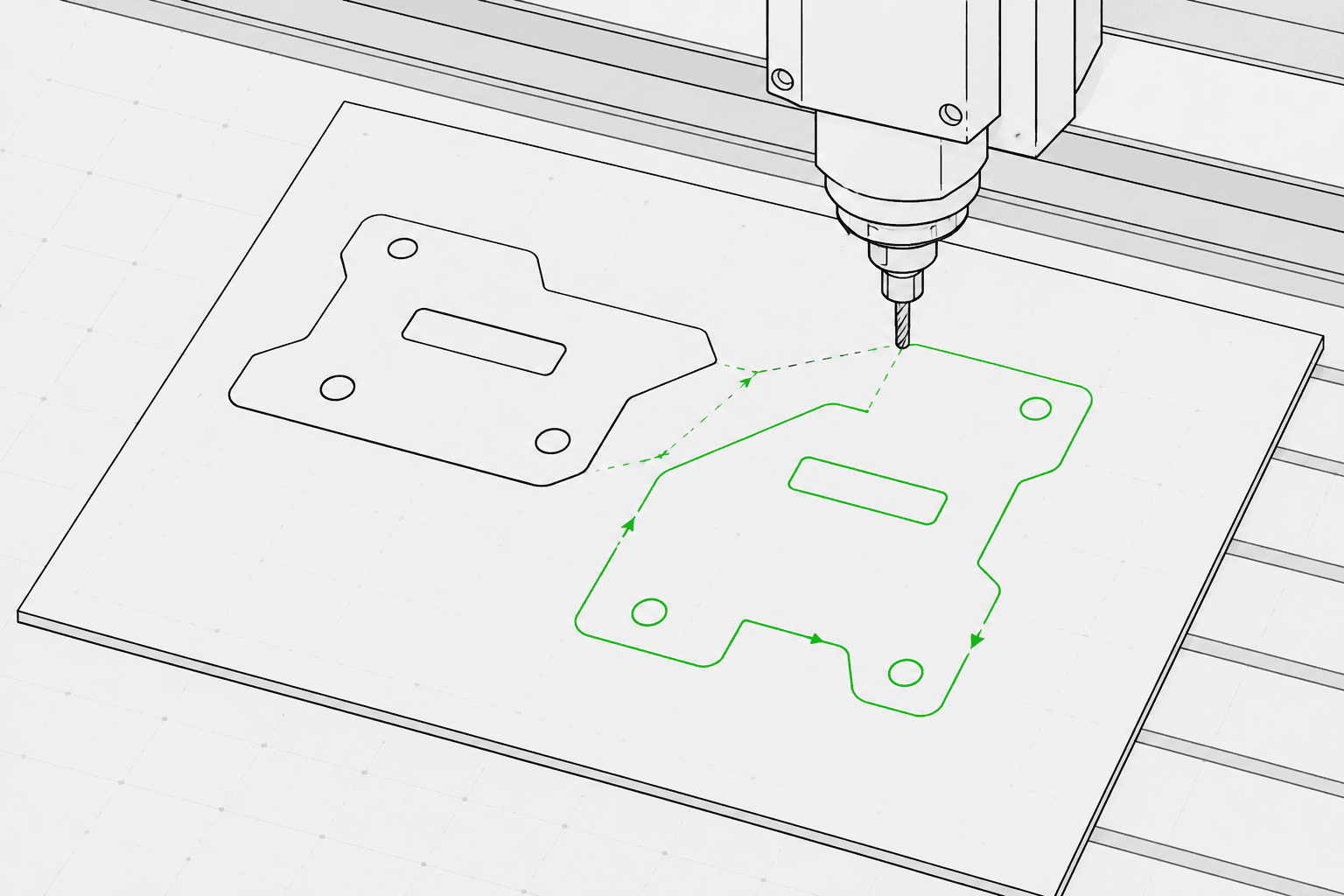
Pixel2Lines konwertuje pliki SVG oparte na ścieżkach na G-Code dla trzech profili maszynowych: laser GRBL, laser uniwersalny oraz ploter pisakowy. Dane wyjściowe wykorzystują szybkie przesunięcia G0 i posuwowe przesunięcia G1 — polecenia M3 i M5 sterują mocą lasera za pomocą parametru S (0–1000) lub pozycją pisaka za pomocą konfigurowalnych szablonów. Użytkownik określa cel operacji (grawerowanie liniowe, nacinanie, cięcie lub rysowanie), wymiary obszaru roboczego w mm, prędkość posuwu, prędkość szybkiego ruchu, procentową moc lasera oraz liczbę przebiegów. Krzywe Beziera i łuki są konwertowane na odcinki polilinii z konfigurowalną tolerancją — polecenia łukowe G2/G3 nie są generowane, co zapewnia zgodność z podstawowymi i starszymi sterownikami.
Przed wygenerowaniem G-Code potok weryfikuje plik SVG: geometria poza skonfigurowanym obszarem roboczym, otwarte ścieżki przeznaczone do operacji cięcia oraz pliki SVG bez konwertowalnej geometrii wektorowej są blokowane z konkretnym komunikatem błędu. Aktywny tekst, osadzone obrazy, gradienty, maski i ścieżki obcinania generują ostrzeżenia — przed przesłaniem należy je spłaszczyć w edytorze SVG. Użytkownik otrzymuje plik G-Code, raport JSON z granicami, mapowaniem operacji, statystykami geometrii i sumami kontrolnymi oraz podgląd ścieżki narzędzia SVG pokazujący ruchy przesuwu jako linie przerywane, a ścieżki robocze oznaczone kolorami według rodzaju operacji. Operacje routera CNC — kieszeniowanie, głębokość Z, zakładki, wejścia i kompensacja narzędzia — nie są uwzględnione.
Konwertuj pliki SVG oparte na ścieżkach na G-Code dla profili lasera GRBL, lasera uniwersalnego i plotera pisakowego, korzystając z walidacji preflight, raportu JSON i podglądu ścieżki narzędzia SVG przy każdej konwersji.
Najlepsze do rysunków SVG opartych na ścieżkach, logo, etykiet, konturów i geometrii gotowej do rysowania. Przed przesłaniem spłaszcz aktywny tekst, gradienty, maski, osadzone obrazy i złożone efekty.
Wybierz profil maszyny (laser GRBL, laser uniwersalny lub ploter pisakowy), cel operacji (grawerowanie liniowe, nacinanie, cięcie lub rysowanie), szerokość i wysokość obszaru roboczego w mm, prędkość posuwu (mm/min), prędkość szybkiego ruchu (mm/min), moc lasera (0–100%) i liczbę przebiegów (1–20). Mapowanie kolorów SVG na operacje jest opcjonalne: niebieskie ścieżki odpowiadają nacinaniu, zielone grawerowaniu, a czerwone cięciu, gdy ta funkcja jest włączona.
Potok blokuje zadania z geometrią poza skonfigurowanym obszarem roboczym, otwartymi ścieżkami przeznaczonymi do operacji cięcia oraz plikami SVG bez konwertowalnej geometrii wektorowej. Aktywny tekst, osadzone obrazy, gradienty, maski, filtry i ścieżki obcinania generują ostrzeżenia — te elementy muszą zostać spłaszczone przed przesłaniem.
Pobierz plik G-Code, raport JSON z granicami, mapowaniem operacji, statystykami geometrii i sumami kontrolnymi oraz podgląd ścieżki narzędzia SVG. Podgląd pokazuje granicę obszaru roboczego, ruchy przesuwu jako linie przerywane oraz ścieżki robocze oznaczone kolorami według rodzaju operacji. Bezpieczeństwo maszyny — prawidłowy punkt odniesienia, ostrość, materiał, prędkość i moc — pozostaje w gestii operatora.
Skupia się na grawerowaniu laserowym, nacinaniu, lekkim cięciu i przepływach pracy liniowych ploterów pisakowych. Pełne operacje CNC CAM, takie jak kieszeniowanie, zakładki, głębokość Z, kompensacja narzędzia i ścieżki narzędzia routera, nie są uwzględnione.
G-Code dla profili lasera GRBL, lasera uniwersalnego lub plotera pisakowego. Używa liniowych przesunięć G0/G1 oraz poleceń sterowania mocą M3/M5. Brak poleceń łukowych (G2/G3) — zapewnia szeroką kompatybilność ze sterownikami.
Raport JSON ze statusem preflight, blokadami, ostrzeżeniami, granicami geometrii w mm, podsumowaniem mapowania operacji, liczbą ścieżek, liczbą segmentów, szacowaną odległością przesuwu i sumami kontrolnymi.
Statyczny SVG przedstawiający skonfigurowany obszar roboczy, ruchy przesuwu (linie przerywane) oraz ścieżki robocze oznaczone kolorami według operacji: cięcie na czerwono, nacinanie na niebiesko, grawerowanie i rysowanie na czarno.
Używaj grafiki wektorowej opartej na czystych ścieżkach i unikaj nieobsługiwanych funkcji SVG, takich jak obrazy rastrowe, maski, gradienty i aktywny tekst.
Wybierz profil maszyny (laser GRBL, laser uniwersalny lub ploter pisakowy), cel operacji (grawerowanie, nacinanie, cięcie lub rysowanie), wymiary obszaru roboczego w mm, prędkość posuwu, prędkość szybkiego ruchu, procentową moc lasera oraz liczbę przebiegów na pasku bocznym obszaru roboczego.
Sprawdź podgląd ścieżki narzędzia i raport, a następnie pobierz plik G-Code, raport JSON i podgląd ścieżki narzędzia SVG.
Konwertuj grafikę konturową, logo, ornamenty i Wektoryzację grafiki liniowej na G-Code do grawerowania laserowego.
Konwertuj Wektoryzację grafiki liniowej na G-Code dla ploterów pisakowych z kontrolą podnoszenia i opuszczania pisaka za pomocą serwomechanizmu (M3/M5) lub szablonów unoszenia osi Z.
Przeprowadź kontrolę preflight i wyświetl podgląd ścieżek narzędzia SVG przed importem do LightBurn, RDWorks lub dowolnego oprogramowania laserowego obsługującego pliki SVG.
Generuj powtarzalne ścieżki liniowe dla nazw, etykiet, drobnych upominków i markowych zasobów produkcyjnych.
Przygotuj kontrolowane linie SVG dla etykiet, tabliczek, znaków kierunkowych i elementów wystawowych.
Przeprowadź kontrolę preflight w celu wykrycia nieobsługiwanych funkcji SVG, geometrii poza obszarem roboczym i otwartych ścieżek przed rozpoczęciem pełnej konwersji G-Code.
Najlepiej sprawdzają się pliki SVG oparte na czystych ścieżkach. Przekonwertuj aktywny tekst na kontury i spłaszcz osadzone obrazy, maski, gradienty, ścieżki obcinania i efekty wizualne przed przesłaniem. Pliki SVG z jawnymi wymiarami fizycznymi (mm, cm lub cale) są konwertowane z zadeklarowanym rozmiarem; pliki SVG oparte na pikselach domyślnie używają rozdzielczości 96 DPI.
Żadne oprogramowanie nie może zagwarantować fizycznego bezpieczeństwa maszyny bez znajomości konkretnej maszyny, materiału, punktu odniesienia, ostrości i konfiguracji. Pixel2Lines zapewnia G-Code profilowany pod maszynę, kontrole preflight, ostrzeżenia i podgląd, jednak użytkownik musi zweryfikować konfigurację maszyny przed jej uruchomieniem.
Nie. Usługa ta skupia się na przepływach pracy w zakresie grawerowania liniowego laserowego, nacinania, lekkiego cięcia i plotowania pisakowego. Operacje routera CNC — kieszeniowanie, zakładki, głębokość Z, wejścia i kompensacja narzędzia — nie są uwzględnione.
Otrzymujesz plik G-Code skonfigurowany dla wybranego profilu maszynowego, raport JSON ze statusem preflight, blokadami, ostrzeżeniami, granicami geometrii w mm, mapowaniem operacji, liczbą ścieżek i sumami kontrolnymi, a także statyczny podgląd ścieżki narzędzia SVG przedstawiający ruchy przesuwu i ścieżki robocze do kontroli wizualnej przed uruchomieniem maszyny.
Wybierz laser GRBL dla maszyn działających na oprogramowaniu sprzętowym GRBL — obejmuje to większość biurkowych grawerów laserowych. Wybierz laser uniwersalny dla sterowników akceptujących standardowy G-Code z poleceniami laserowymi M3/M5, które mogą nie obsługiwać wszystkich rozszerzeń GRBL. Wybierz ploter pisakowy dla maszyn rysujących wykorzystujących serwomechanizm lub mechanizm osi Z do podnoszenia i opuszczania pisaka — następnie wybierz odpowiedni szablon sterowania pisaka (serwomechanizm M3/M5 lub unoszenie osi Z) dostosowany do Twojego sprzętu.
