Čistý vstup SVG
Nejlepší pro kresby SVG založené na cestách, loga, štítky, obrysy a geometrii připravenou ke kreslení. Před nahráním sloučte živý text, přechody, masky, vložené obrázky a složité efekty.
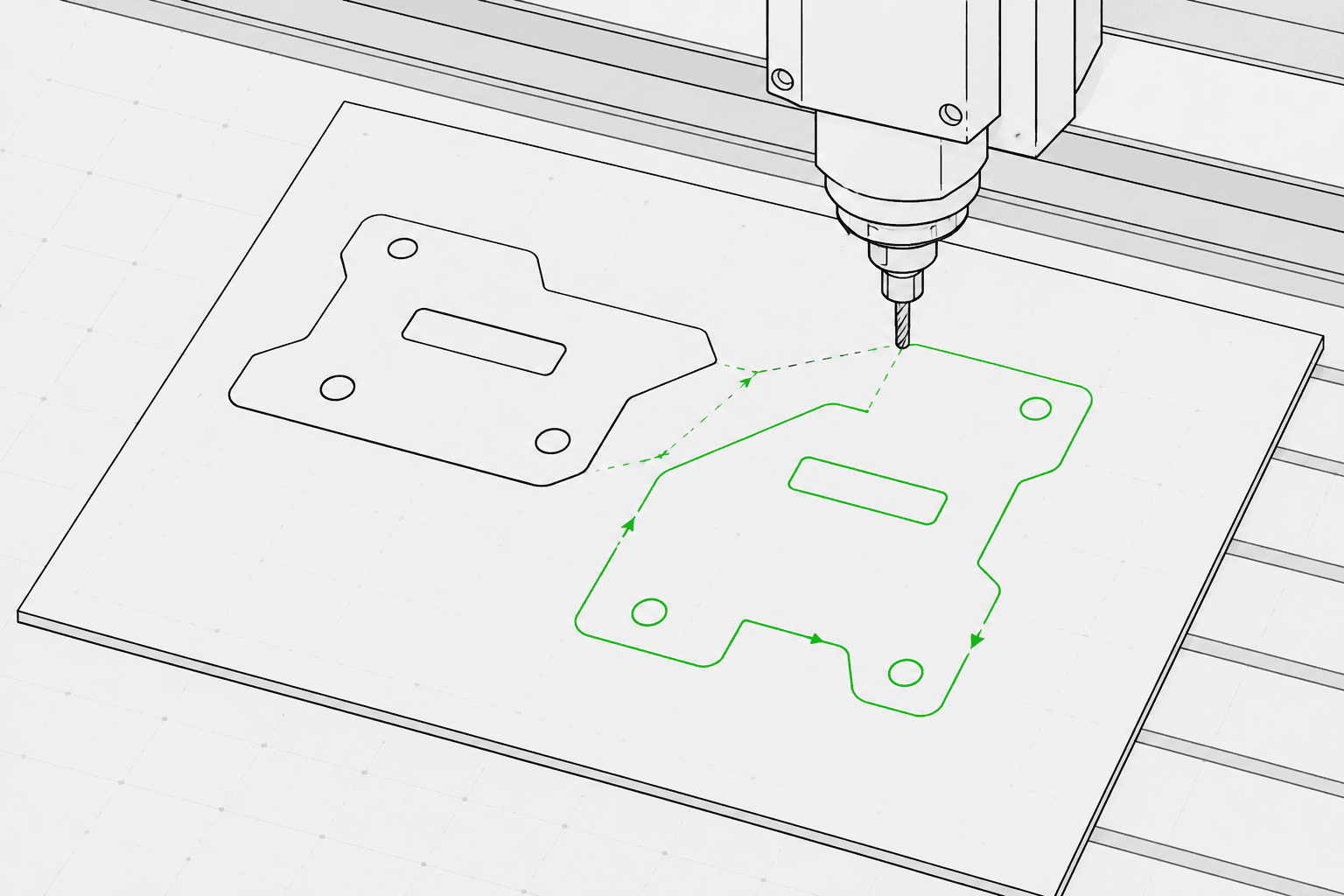
Pixel2Lines převádí soubory SVG založené na cestách na G-Code pro tři strojové profily: GRBL laser, obecný laser a peropísač. Výstup využívá rychlé pohyby G0 a pracovní pohyby G1 — příkazy M3 a M5 řídí výkon laseru prostřednictvím parametru S (0–1000), nebo polohu pera pomocí konfigurovatelných šablon. Uživatel nastavuje typ operace (čárové gravírování, rýhování, řezání nebo kreslení), rozměry pracovní oblasti v mm, rychlost posuvu, rychlost přejezdu, procentuální výkon laseru a počet průchodů. Bezierovy křivky a oblouky jsou převedeny na segmenty polylinie s konfigurovatelnou tolerancí — příkazy oblouků G2/G3 nejsou generovány, což zajišťuje kompatibilitu se základními a staršími řadiči.
Před generováním G-Code pipeline ověří SVG soubor: geometrie mimo nakonfigurovanou pracovní oblast, otevřené cesty určené pro operace řezání a SVG bez převoditelné vektorové geometrie jsou blokovány s konkrétní chybou. Živý text, vložené obrázky, přechody, masky a ořezové cesty vyvolávají varování — tyto prvky musí být sloučeny v editoru SVG před nahráním. Uživatel obdrží soubor G-Code, zprávu JSON s hranicemi, mapováním operací, statistikami geometrie a kontrolními součty a náhled dráhy nástroje SVG zobrazující přejezdové pohyby jako přerušované čáry a pracovní cesty barevně odlišené podle typu operace. Operace CNC routeru — kapsování, hloubka Z, přídavky, náběhy a kompenzace nástroje — nejsou zahrnuty.
Převeďte soubory SVG založené na cestách na G-Code pro profily GRBL laseru, obecného laseru a peropísače s předletovou kontrolou, zprávou JSON a náhledem dráhy nástroje SVG ke každé konverzi.
Nejlepší pro kresby SVG založené na cestách, loga, štítky, obrysy a geometrii připravenou ke kreslení. Před nahráním sloučte živý text, přechody, masky, vložené obrázky a složité efekty.
Vyberte strojový profil (GRBL laser, obecný laser nebo peropísač), typ operace (čárové gravírování, rýhování, řezání nebo kreslení), šířku a výšku pracovní oblasti v mm, rychlost posuvu (mm/min), rychlost přejezdu (mm/min), výkon laseru (0–100 %) a počet průchodů (1–20). Mapování barev SVG na operace je volitelné: modré cesty se mapují na rýhování, zelené na gravírování a červené na řezání, pokud je tato funkce povolena.
Pipeline blokuje úlohy s geometrií mimo nakonfigurovanou pracovní oblast, otevřenými cestami určenými pro operace řezání a SVG bez převoditelné vektorové geometrie. Živý text, vložené obrázky, přechody, masky, filtry a ořezové cesty vyvolávají varování — tyto prvky musí být sloučeny před nahráním.
Stáhněte soubor G-Code, zprávu JSON s hranicemi, mapováním operací, statistikami geometrie a kontrolními součty a náhled dráhy nástroje SVG. Náhled zobrazuje hranici pracovní oblasti, přejezdové pohyby jako přerušované čáry a pracovní cesty barevně odlišené podle typu operace. Bezpečnost stroje — správný počátek, zaostření, materiál, rychlost a výkon — zůstává odpovědností obsluhy.
Zaměřeno na laserové gravírování, rýhování, lehké řezání a pracovní postupy čárového peropísače. Kompletní operace CNC CAM, jako je kapsování, přídavky, hloubka Z, kompenzace nástroje a dráhy nástroje routeru, nejsou zahrnuty.
G-Code pro profily GRBL laseru, obecného laseru nebo peropísače. Využívá lineární pohyby G0/G1 a příkazy výkonu M3/M5. Bez příkazů oblouků (G2/G3) pro širokou kompatibilitu s řadiči.
Zpráva JSON se stavem předletové kontroly, blokátory, varováními, hranicemi geometrie v mm, přehledem mapování operací, počtem cest, počtem segmentů, odhadovanou vzdáleností přejezdu a kontrolními součty.
Statický SVG zobrazující nakonfigurovanou pracovní oblast, přejezdové pohyby (přerušované čáry) a pracovní cesty barevně odlišené podle operace: řezání červeně, rýhování modře, gravírování a kreslení černě.
Použijte čistou vektorovou kresbu založenou na cestě a vyhněte se nepodporovaným funkcím SVG, jako jsou rastrové obrázky, masky, přechody a nevyřešený text.
Vyberte strojový profil (GRBL laser, obecný laser nebo peropísač), typ operace (gravírování, rýhování, řezání nebo kreslení), rozměry pracovní oblasti v mm, rychlost posuvu, rychlost přejezdu, procentuální výkon laseru a počet průchodů na postranním panelu pracovního prostoru.
Zkontrolujte náhled dráhy nástroje a zprávu, poté stáhněte soubor G-Code, zprávu JSON a náhled dráhy nástroje SVG.
Převeďte obrysové kresby, loga, ozdoby a kresby SVG na G-Code pro laserové čárové gravírování.
Převeďte kresby SVG na G-Code pro peropísací stroje s ovládáním zdvihu pera přes servo (M3/M5) nebo šablony zdvihu osy Z.
Proveďte předletovou kontrolu a zobrazte náhled dráhy nástroje SVG před importem do LightBurn, RDWorks nebo jakéhokoli laserového softwaru, který přijímá vstup SVG.
Generujte opakovatelné gravírovací dráhy pro jména, štítky, malé dárky a značkové výrobní podklady.
Připravte vektorový podklad SVG pro štítky, tabulky, směrové značení a zobrazovací prvky.
Proveďte předletovou kontrolu a odhalte nepodporované funkce SVG, geometrii mimo pracovní oblast a otevřené cesty před zahájením plné konverze G-Code.
Nejlépe fungují čisté soubory SVG založené na cestách. Před nahráním převeďte živý text na obrysy a sloučte vložené obrázky, masky, přechody, ořezové cesty a vizuální efekty. SVG s explicitními fyzickými rozměry (mm, cm nebo palce) jsou převedeny v deklarované velikosti; SVG v pixelech používají výchozí hodnotu 96 DPI.
Žádný software nemůže zaručit fyzickou bezpečnost stroje bez znalosti konkrétního stroje, materiálu, počátku najetí, zaostření a nastavení. Pixel2Lines poskytuje strojově profilovaný G-Code, předletové kontroly, varování a náhled, ale uživatel musí před spuštěním ověřit nastavení stroje.
Ne. Tato služba se zaměřuje na laserové čárové gravírování, rýhování, lehké řezání a pracovní postupy peropísačů. Operace CNC routeru — kapsování, přídavky, hloubka Z, náběhy a kompenzace nástroje — nejsou zahrnuty.
Obdržíte soubor G-Code nakonfigurovaný pro vybraný strojový profil, zprávu JSON se stavem předletové kontroly, blokátory, varováními, hranicemi geometrie v mm, mapováním operací, počty cest a kontrolními součty a statický náhled dráhy nástroje SVG zobrazující přejezdové pohyby a pracovní cesty pro vizuální kontrolu před spuštěním stroje.
Zvolte GRBL laser pro stroje s firmwarem GRBL — to zahrnuje většinu stolních laserových gravérů. Zvolte obecný laser pro řadiče, které přijímají standardní G-Code s laserovými příkazy M3/M5, ale nemusí podporovat všechna rozšíření GRBL. Zvolte peropísač pro kreslicí stroje, které využívají servo nebo mechanismus zdvihu osy Z ke zvedání a spouštění pera — poté vyberte odpovídající šablonu ovládání pera (servo M3/M5 nebo zdvih osy Z) pro váš hardware.
