Maintenance en cours - L'inscription sera bientôt possible !

Pixel2Lines

Services
Photo en dessin au trait
SVG pour la gravure laser
Photo en vectorisation SVG
Illustration d’architecture
SVG→DXF
SVG to DXF
SVG→G-Code
SVG to G-Code
Agrandissement d’image IA
Détourage photo
Détourage photo
Numérisation de broderie
GalerieTarifsÉditeur SVG
Atelier
  1. Accueil/
  2. Services/
  3. SVG to DXF Converter

SVG to DXF Converter

Production CAD-ready SVG to DXF workflow

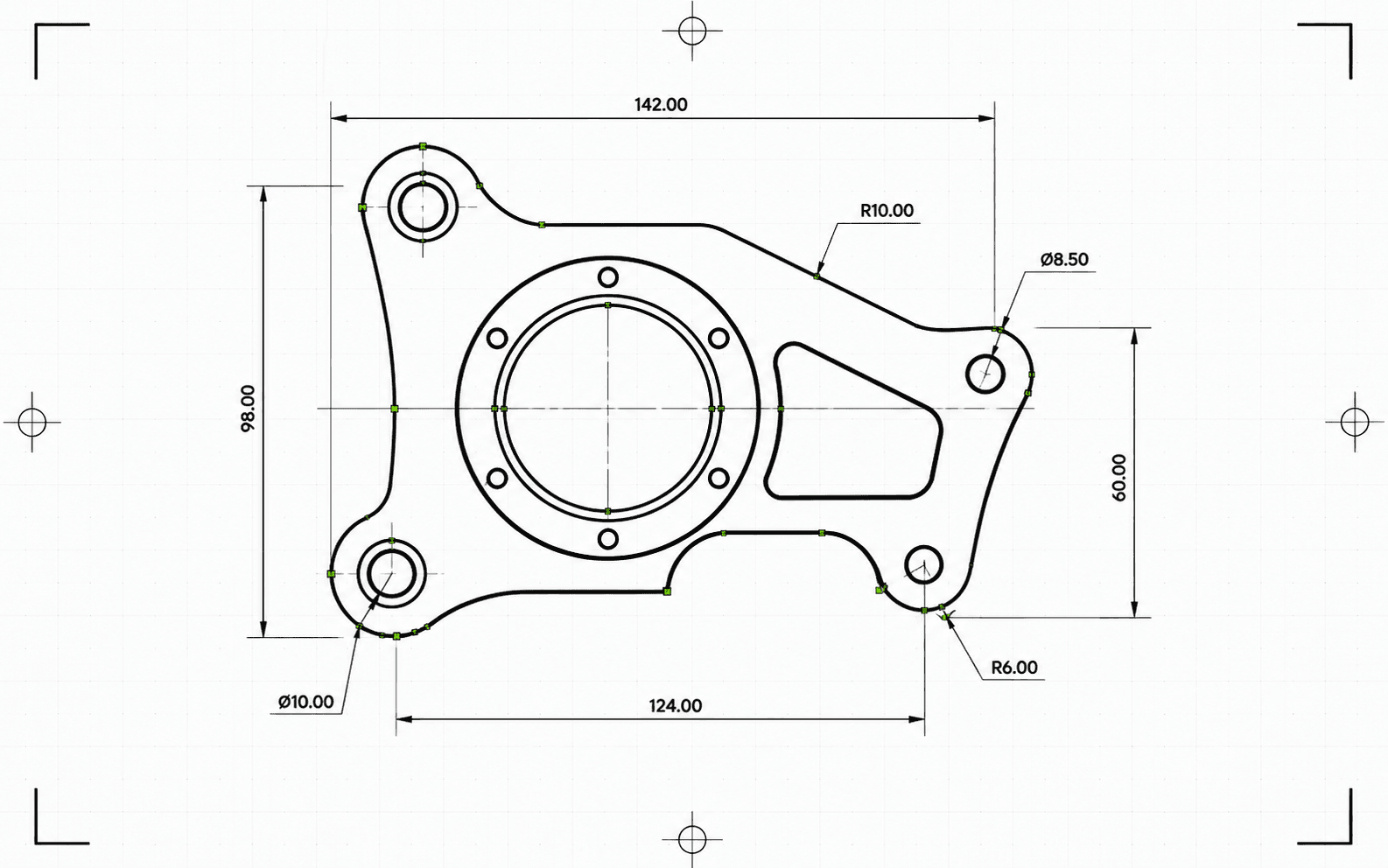
SVG line artwork prepared for DXF CAD export
...Crédits/ rendu

Pixel2Lines converts clean path-based SVG files into CAD-ready DXF output with strict feature blocking, dimensional checks, layer preservation, and entity-level validation. It is built for paid workflows where silent geometry loss is not acceptable.

The professional workflow returns the DXF file together with a structured JSON report covering blockers, warnings, dimensions, entity counts, cleanup actions, checksums, and delivery metadata. Unsupported SVG features must be flattened before conversion.

Professional SVG-to-DXF workflow

Create CAD-ready DXF output from clean SVG linework with strict validation, dimensional policy, and report-backed artifact delivery.

Clean SVG input

Best for path-based artwork, logos, labels, diagrams, and line drawings. Unsupported SVG effects are blocked unless flattened before upload.

Explicit dimensions

Physical units and reliable scaling are treated as production requirements. Ambiguous dimensions are surfaced before paid delivery.

CAD delivery validation

The engine checks write counts, finite extents, units, ezdxf audit results, entity consistency, and validation blockers before completing the job.

DXF plus report

Download the validated .dxf file and a JSON report containing status, warnings, blockers, entity counts, cleanup notes, byte sizes, and checksums.

Focused on trustworthy SVG-to-DXF geometry conversion. Raster images, live text, masks, filters, gradients, and complex visual effects must be flattened before upload unless explicitly supported by the engine.

Output artifacts

  • DXF

    DXF — CAD file

    Production DXF output for CAD, laser cutting, CNC layout, and vector archive handoff.

  • JSON

    JSON — Conversion report

    Structured preflight and delivery report with status, blockers, warnings, dimensions, entity counts, and artifact metadata.

How it works

  1. 1

    Upload a clean SVG

    Use path-based SVG artwork. Flatten live text, images, filters, masks, clip paths, gradients, and complex effects before upload.

  2. Arrow right
  3. 2

    Run production preflight

    The engine checks unsupported features, hidden geometry, dimensions, layers, cleanup actions, and CAD delivery constraints before writing DXF.

  4. Arrow right
  5. 3

    Download DXF and report

    Receive a validated DXF artifact and a structured report with checksums, byte sizes, entity counts, warnings, and blocking issues if conversion cannot be trusted.

Obtenez des crédits maintenant et commencez le rendu

Best use cases

  • CAD handoff

    Prepare SVG logos, layouts, labels, line drawings, and diagrams for CAD applications that need DXF input.

    Open workspace
  • Laser cutting prep

    Convert clean vector paths into DXF while preserving practical layer semantics for cut, score, engrave, and detail workflows.

    Open workspace
  • CNC layout exchange

    Create a CAD exchange file for downstream CAM setup where geometry integrity and predictable units matter.

    Open workspace
  • Technical archive

    Store client artwork and production drawings in a CAD-friendly vector format with report-backed provenance.

    Open workspace
  • Layered production files

    Preserve meaningful SVG groups and production layer names where possible for cleaner CAD organization.

    Open workspace
  • SVG preflight

    Detect unsupported visual features, ambiguous dimensions, hidden content, and validation problems before paid delivery.

    Open workspace

FAQ

What SVG files work best?

Clean path-based SVG files work best. Flatten embedded images, live text, masks, filters, gradients, clip paths, external CSS, and unsupported effects before upload.

Will hidden SVG content become CAD geometry?

The production pipeline applies visibility rules for display, visibility, opacity, fill opacity, stroke opacity, stroke width, and hidden content so invisible artwork is not silently converted into DXF geometry.

How are SVG dimensions handled?

Explicit physical dimensions are preferred. Pixel-based dimensions use a documented DPI assumption, while ambiguous viewBox-only or percentage-only dimensions are blocked unless the workflow records a trusted scale policy.

What do I receive?

You receive a DXF file and a structured JSON conversion report with status, blockers, warnings, entity counts, validation details, artifact size, and checksum metadata.

Start SVG to DXF conversion in the workspace

Services de flux de travail


  • Photo en dessin au traitVectoriel
  • SVG pour la gravure laserVectoriel
  • SVG to G-CodeVectoriel
  • Détourage photoTrame
  • Photo en vectorisation SVGVectoriel
  • Photo vers numérisation de broderieVectoriel
  • Illustration d’architectureTrame
  • Photo vers grille de compositionTrame
  • Galerie
  • Tarifs
  • À propos
  • Technologie
  • Développement de flux SVG sur mesure
  • Contacter le support

Outils de conversion


  • Convertisseurs de fichiers
  • JPG en PNG
  • JPG en WEBP
  • JPG en AVIF
  • JPG en ICO
  • PNG en JPG
  • PNG en AVIF
  • PNG en WEBP
  • PNG en ICO
  • WEBP en JPG
  • WEBP en PNG
  • WEBP en AVIF
  • AVIF en JPG
  • AVIF en PNG
  • AVIF en WEBP
  • SVG en PNG
  • SVG en JPG
  • SVG en WEBP
  • SVG en AVIF
  • SVG en PDFPrime
  • SVG en EPSPrime
  • SVG en AIPrime
  • SVG en DXFPrime
  • PDF en PNG
  • BMP en PNG
  • DXF en SVGPrime

Guides


  • Guides utiles

Pixel2Lines

  • Mentions légales
  • Politique de confidentialité
  • Conditions
  • Biscuits