Ren SVG-inmatning
Passar bäst för sökvägsbaserat konstverk, logotyper, etiketter, diagram och Vektorisering av linjeteckning. Levande text, rasterbilder, masker, filter, gradienter och komplexa effekter bör plattas ut innan uppladdning.
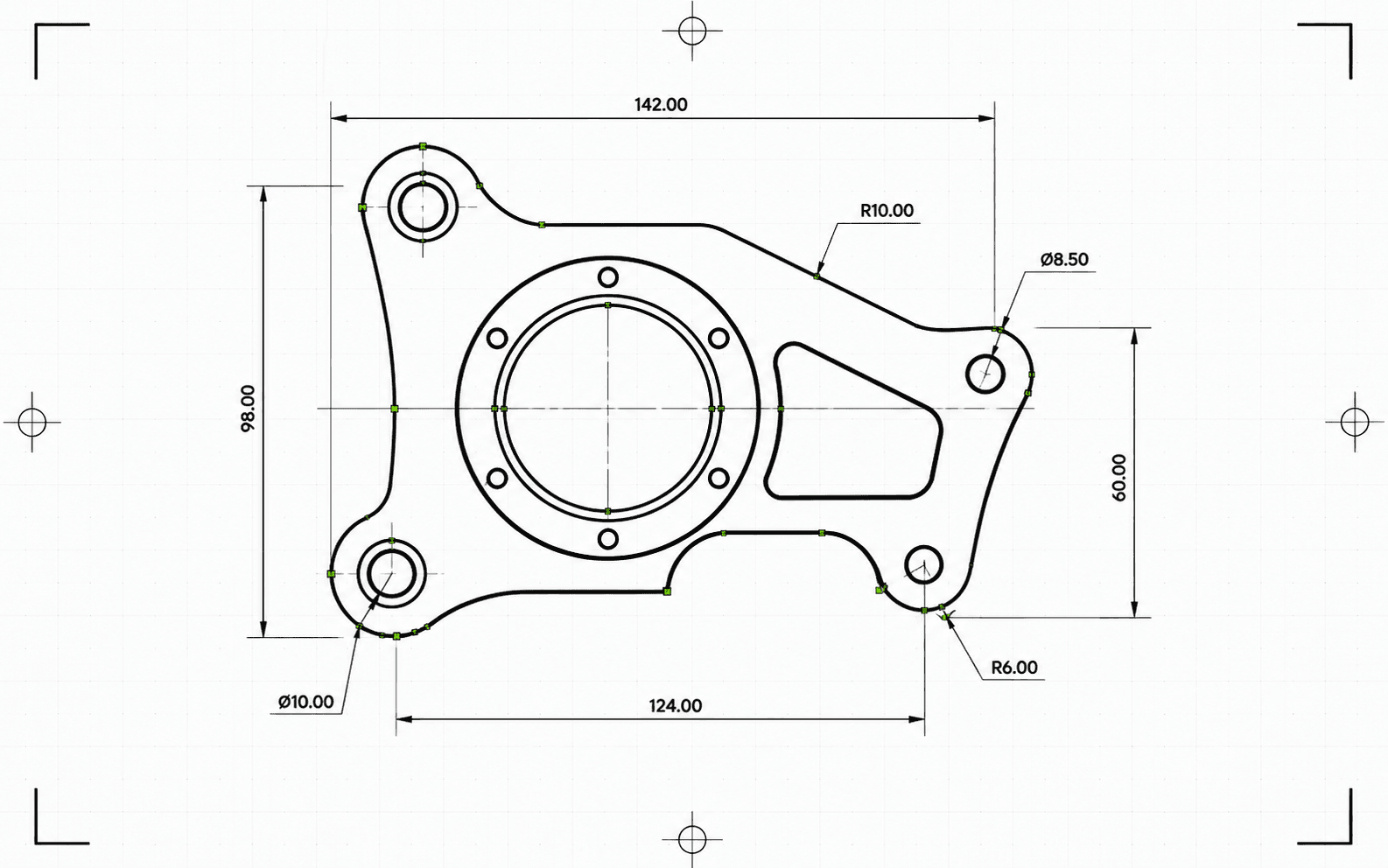
Pixel2Lines konverterar sökvägsbaserade SVG-filer till DXF R2010 i millimeter. Bezier-kurvor testas mot en cirkulär tolerans och skrivs som äkta bågentiteter där passningen godkänns — i stället för att plattas ut till polylinjessegment. SVG-färger mappas till DXF-lager: röda sökvägar till Cut, blå till Score, gröna till Engrave. Svarta och akromatiska sökvägar hamnar som standard i Cut. Semantiska grupp-ID:n (CUT_HOLES, CUT_OUTER, DETAIL) bevaras som exakta DXF-lagernamn. Geometrin rensas innan filen skrivs: korta segment, duplicerade entiteter och nära-gap öppna sökvägar åtgärdas automatiskt.
Innan konverteringen validerar pipelinen SVG:n: levande text blockerar jobbet med ett specifikt fel, och SVG:er utan explicita fysiska mått blockeras i stället för att skalas tyst. Gradienter, masker, filter och klippbanor hoppas över med varningar — dessa måste plattas ut i din SVG-redigerare först. Du får en DXF-fil och en JSON-rapport med status, blockerare, varningar, bekräftade mått, entitetsantal per lager, utförda rensningsåtgärder, artefaktstorlek och kontrollsummor.
Konvertera sökvägsbaserade SVG-filer till DXF R2010 i millimeter med verifierad skala, bågexakt geometri och en JSON-rapport för varje konvertering.
Passar bäst för sökvägsbaserat konstverk, logotyper, etiketter, diagram och Vektorisering av linjeteckning. Levande text, rasterbilder, masker, filter, gradienter och komplexa effekter bör plattas ut innan uppladdning.
Fysiska mått behandlas som ett krav. SVG:er med explicit bredd och höjd i mm, cm eller tum konverteras med sina deklarerade storlekar. SVG:er med enbart viewBox utan fysiska enheter blockeras — DXF-filen produceras inte i en overifierad skala. Utmatningens DXF deklarerar millimeter i sin sidhuvud ($INSUNITS=4).
Bezier-kurvor anpassas mot en cirkel med ett 5-punktsprov vid 0,01 mm tolerans. Kurvor som godkänns skrivs som ARC-entiteter; kurvor som inte godkänns approximeras som linjessegment med samma tolerans. Efter skrivning valideras DXF-filen: enhetssidhuvud, ändliga utsträckningar, entitetsantal och koordinatgiltighet. Utmatningen är i R2010-format, läsbart av AutoCAD, LightBurn, RDWorks, Fusion 360 och standardiserad CAM-programvara.
Ladda ner den validerade DXF-filen och en JSON-rapport med status, varningar, blockerare, mått, lagertilldelningar, entitetsantal, rensningsnoteringar, bytestorlekar och kontrollsummor. Entiteter i DXF-filen är ordnade för skärning: inre former före yttre konturer, så att innerutskärningar slutförs innan omgivande material frigörs.
Inriktad på tillförlitlig 2D SVG-till-DXF-geometrikonvertering för CAD, laserprogramvara och CAM-överlämning. Rasterbilder, levande text, masker, filter, gradienter och komplexa visuella effekter måste plattas ut först. Verktygsbanesgenerering för CNC och router-CAM-operationer ingår inte.
DXF R2010-utmatning i millimeter för CAD-import, laserprogramvara, CAM-överlämning och vektorarkivering.
Strukturerad preflight- och leveransrapport med status, blockerare, varningar, mått, lager, entitetsantal, rensningsåtgärder och kontrollsummor.
Använd en sökvägsbaserad SVG med äkta vektorgeometri. Konvertera levande text till konturer och platta ut inbäddade bilder, masker, filter, klippbanor, gradienter och andra visuella effekter innan uppladdning.
Omvandlaren kontrollerar SVG-funktioner som inte stöds, transparent eller osynlig geometri samt saknade fysiska mått. Jobb som skulle ge otillförlitlig utmatning blockeras med ett specifikt fel innan DXF-filen skrivs.
Ladda ner en validerad DXF R2010-fil och en JSON-rapport med kontrollsummor, bytestorlekar och entitetsantal. Varningar och blockerare inkluderas i rapporten när problem upptäcktes under konverteringen.
Förbered SVG-logotyper, layouter, etiketter, ritningar och diagram för CAD-applikationer som kräver DXF-inmatning.
Konvertera rena vektorsökvägar till DXF med Cut, Score, Engrave eller semantiska produktionslager där SVG:n stöder det.
Skapa en DXF-utbytesfil för nedströms CAD/CAM-konfiguration. Verktygsbanan, Z-djup, tabbar, fickor och fräskompensation hanteras i CAM-programvaran.
Lagra klientkonstverk och produktionsritningar i ett CAD-vänligt vektorformat med rapportstödd härkomst.
Använd färg och stödda gruppsemantikar för att organisera DXF-lager som Cut, Score, Engrave, CUT_HOLES, CUT_OUTER och DETAIL.
Kör en testkörning för att upptäcka funktioner som inte stöds, tvetydiga mått och geometriproblem innan du startar en fullständig konvertering.
Rena sökvägsbaserade SVG-filer fungerar bäst. Platta ut inbäddade bilder, levande text, masker, filter, gradienter, klippbanor, extern CSS och effekter som inte stöds innan uppladdning.
Utmatningen använder entiteterna LINE, ARC, CIRCLE och LWPOLYLINE — de typer som stöds av AutoCAD, LightBurn, RDWorks, Fusion 360 och de flesta laserstyrenheter. Inga SPLINE-entiteter skrivs, vilket säkerställer kompatibilitet med äldre maskinstyrenheter. Bezier-kurvor som matchar en cirkulär form inom 0,01 mm skrivs som ARC-entiteter; övriga approximeras som linjessegment med samma tolerans. Fullständiga cirklar identifieras och skrivs som CIRCLE-entiteter.
SVG:er med explicit bredd och höjd i mm, cm eller tum konverteras med sina deklarerade mått. Pixelbaserade SVG:er använder 96 DPI som standard. SVG:er med enbart viewBox utan explicita fysiska enheter blockeras — DXF-filen levereras inte i en overifierad skala.
Du får en DXF-fil och en strukturerad JSON-konverteringsrapport med status, blockerare, varningar, mått, entitets- och lagerantal, valideringsdetaljer, artefaktstorlekar och kontrollsummor. Verktygsbana för CNC-router, Z-djup, tabbar, fickor, inledningssegment, matningar, hastigheter och fräskompensation hanteras i CAM-programvaran.
