Ren SVG-indata
Bäst lämpat för sökvägsbaserade Vektorisering av linjeteckning, logotyper, etiketter, konturer och ritningsklar geometri. Platta till livetext, övertoningar, masker, inbäddade bilder och komplexa effekter före uppladdning.
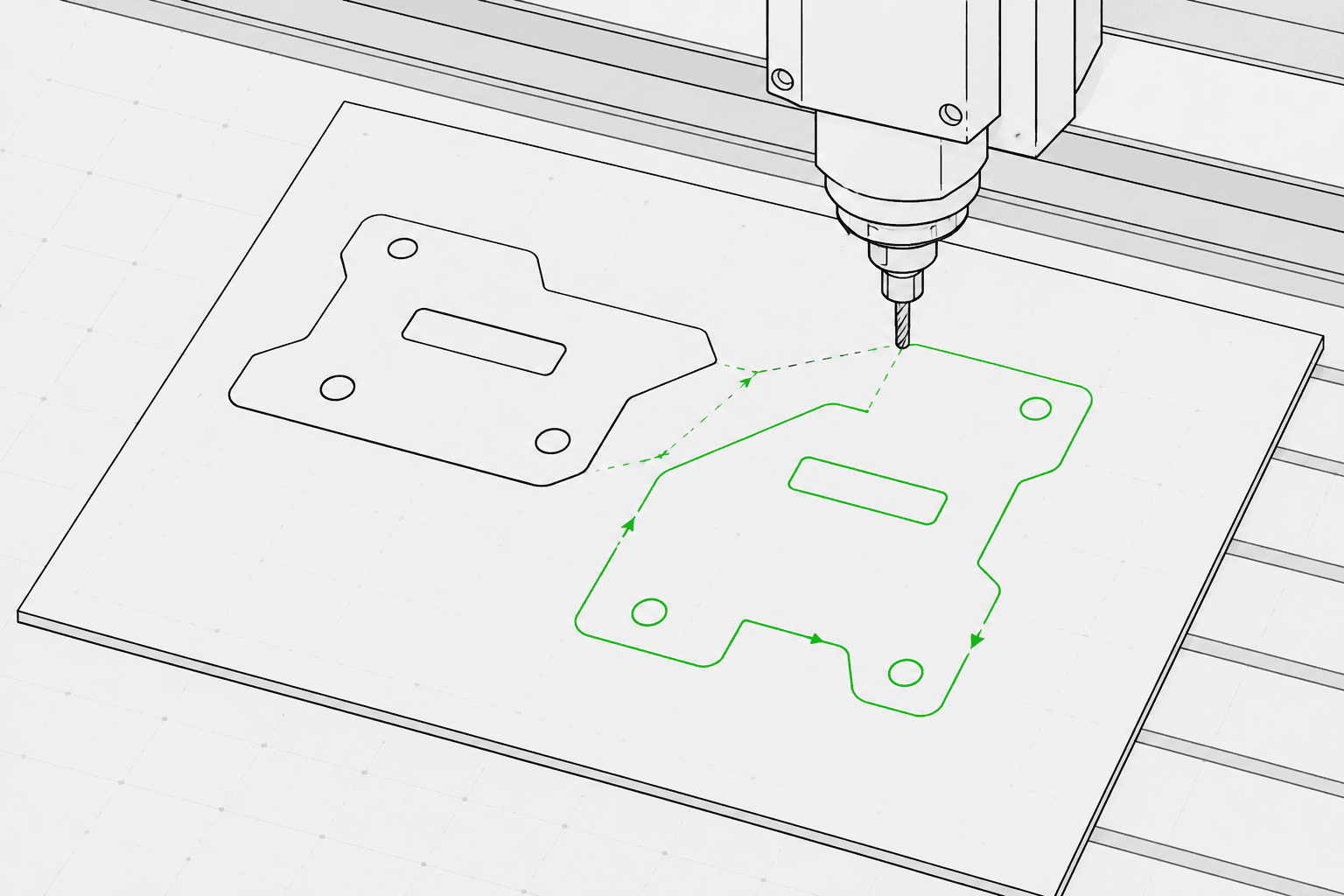
Pixel2Lines konverterar sökvägsbaserade SVG-filer till G-Code för tre maskinprofiler: GRBL-laser, generisk laser och pennplotter. Resultatet använder G0-snabbrörelser och G1-matningsrörelser — M3- och M5-kommandon styr lasereffekten via S-parametern (0–1000), eller pennpositionen via konfigurerbara mallar. Du anger operationsavsikt (linjegravering, skåring, skärning eller plottning), arbetsområdesdimensioner i mm, matningshastighet, körhastighet, lasereffektprocent och antalet pass. Bezier-kurvor och bågar konverteras till polylinjesegment vid konfigurerbar tolerans — inga G2/G3-bågekommandon genereras, vilket gör resultatet kompatibelt med grundläggande och äldre styrenheter.
Innan G-Code genereras validerar systemet SVG-filen: geometri utanför det konfigurerade arbetsområdet, öppna banor avsedda för skärningsoperationer och SVG-filer utan konverterbar vektorgeometri blockeras med ett specifikt felmeddelande. Livetext, inbäddade bilder, övertoningar, masker och klippbanor ger varningar — dessa måste plattas till i SVG-redigeraren innan uppladdning. Du erhåller en G-Code-fil, en JSON-rapport med gränser, operationsmappning, geometristatistik och kontrollsummor, samt en SVG-förhandsvisning av verktygsbanan som visar körrörelser som streckade linjer och arbetsbanor färgkodade efter operationstyp. CNC-routeroperationer — fickning, Z-djup, flikar, inlopp och verktygskompensation — ingår inte.
Konvertera sökvägsbaserade SVG-filer till G-Code för GRBL-laser, generisk laser och pennplotterprofiler — med preflight-validering, en JSON-rapport och en SVG-förhandsvisning av verktygsbanan för varje konvertering.
Bäst lämpat för sökvägsbaserade Vektorisering av linjeteckning, logotyper, etiketter, konturer och ritningsklar geometri. Platta till livetext, övertoningar, masker, inbäddade bilder och komplexa effekter före uppladdning.
Välj maskinprofil (GRBL-laser, generisk laser eller pennplotter), operationsavsikt (linjegravering, skåring, skärning eller plottning), arbetsområdets bredd och höjd i mm, matningshastighet (mm/min), körhastighet (mm/min), lasereffekt (0–100%) och antalet pass (1–20). SVG-färg-till-operationsmappning är valbar: blå banor mappas till skåring, gröna till gravering och röda till skärning när funktionen är aktiverad.
Systemet blockerar jobb med geometri utanför det konfigurerade arbetsområdet, öppna banor avsedda för skärningsoperationer och SVG-filer utan konverterbar vektorgeometri. Livetext, inbäddade bilder, övertoningar, masker, filter och klippbanor ger varningar — dessa element måste plattas till före uppladdning.
Ladda ner G-Code-filen, en JSON-rapport med gränser, operationsmappning, geometristatistik och kontrollsummor, samt en SVG-förhandsvisning av verktygsbanan. Förhandsvisningen visar arbetsområdesgränsen, körrörelser som streckade linjer och arbetsbanor färgkodade efter operationstyp. Maskinsäkerhet — korrekt ursprung, fokus, material, hastighet och effekt — förblir operatörens ansvar.
Inriktad på lasergravering, skåring, lätt skärning och pennplotterlinjearbetsflöden. Fullständiga CNC CAM-operationer såsom fickning, flikar, Z-djup, verktygskompensation och fräsverktygsbanor ingår inte.
G-Code för GRBL-laser, generisk laser eller pennplotterprofiler. Använder G0/G1-linjära rörelser och M3/M5-effektkommandon. Inga bågekommandon (G2/G3) för bred styrenhetkompatibilitet.
JSON-rapport med preflight-status, blockerare, varningar, geometrigränser i mm, sammanfattning av operationsmappning, banräkning, segmentantal, uppskattad körsträcka och kontrollsummor.
Statisk SVG som visar det konfigurerade arbetsområdet, körrörelser (streckade) och arbetsbanor färgkodade efter operation: skärning i rött, skåring i blått, gravering och plottning i svart.
Använd rena sökvägsbaserade vektorbilder och undvik SVG-funktioner som inte stöds, exempelvis rasterbilder, masker, övertoningar och olöst text.
Välj maskinprofil (GRBL-laser, generisk laser eller pennplotter), operationsavsikt (gravering, skåring, skärning eller plottning), arbetsområdesdimensioner i mm, matningshastighet, körhastighet, lasereffektprocent och antalet pass i arbetsytans sidofält.
Kontrollera förhandsvisningen av verktygsbanan och rapporten, ladda sedan ner G-Code-filen, JSON-rapporten och SVG-förhandsvisningen av verktygsbanan.
Konvertera konturbilder, logotyper, ornament och Vektorisering av linjeteckning till G-Code för lasergravering.
Konvertera Vektorisering av linjeteckning till G-Code för pennplottermaskiner med kontroll av penna upp/ned via servo (M3/M5) eller Z-axellyftmallar.
Kör en preflight-kontroll och förhandsgranska SVG-verktygsbanorna innan import till LightBurn, RDWorks eller annan laserprogramvara som accepterar SVG-indata.
Generera repeterbara linjebanor för namn, etiketter, mindre presenter och varumärkesprofilerade produktionstillgångar.
Förbered kontrollerade SVG-linjer för etiketter, skyltar, anvisningsskyltar och utställningsföremål.
Kör en preflight-kontroll för att identifiera SVG-funktioner som inte stöds, geometri utanför arbetsområdet och öppna banor innan en fullständig G-Code-konvertering påbörjas.
Rena sökvägsbaserade SVG-filer fungerar bäst. Konvertera livetext till konturer och platta till inbäddade bilder, masker, övertoningar, klippbanor och visuella effekter före uppladdning. SVG-filer med explicita fysiska dimensioner (mm, cm eller tum) konverteras i angiven storlek; pixelbaserade SVG-filer använder 96 DPI som standard.
Ingen programvara kan garantera fysisk maskinsäkerhet utan exakt kännedom om maskin, material, ursprung, fokus och inställning. Pixel2Lines tillhandahåller maskinprofilerad G-Code, preflight-kontroller, varningar och en förhandsvisning, men användaren måste verifiera maskininställningen innan körning.
Nej. Denna tjänst är inriktad på laserlinjegravering, skåring, lätt skärning och pennplotterarbetsflöden. CNC-routeroperationer — fickning, flikar, Z-djup, inlopp och verktygskompensation — ingår inte.
Du får en G-Code-fil konfigurerad för den valda maskinprofilen, en JSON-rapport med preflight-status, blockerare, varningar, geometrigränser i mm, operationsmappning, banräkningar och kontrollsummor, samt en statisk SVG-förhandsvisning av verktygsbanan som visar körrörelser och arbetsbanor för visuell granskning innan maskinen körs.
Välj GRBL-laser för maskiner som kör GRBL-firmware — detta omfattar de flesta stationära lasergraverare. Välj generisk laser för styrenheter som accepterar standard-G-Code med M3/M5-laserkommandon men eventuellt inte stöder samtliga GRBL-tillägg. Välj pennplotter för ritmaskiner som använder en servo- eller Z-axelmekanism för att lyfta och sänka en penna — välj därefter den matchande pennstyringsmallen (servo M3/M5 eller Z-axellyft) för aktuell hårdvara.
