อินพุต SVG ที่สะอาดเรียบร้อย
เหมาะสมที่สุดสำหรับงานลายเส้น SVG ที่อิงเส้นทาง โลโก้ ป้ายกำกับ โครงร่าง และเรขาคณิตที่พร้อมสำหรับการวาด ควรทำให้ข้อความสด การไล่ระดับสี มาสก์ รูปภาพที่ฝัง และเอฟเฟกต์ที่ซับซ้อนเรียบก่อนอัปโหลด
Pixel2Lines แปลงไฟล์ SVG ที่ใช้เส้นทางเป็น G-Code ตามโปรไฟล์เครื่องสามแบบ ได้แก่ เลเซอร์ GRBL เลเซอร์ทั่วไป และพล็อตเตอร์ปากกา ผลลัพธ์ใช้การเคลื่อนที่แบบ G0 rapid และ G1 feed โดยคำสั่ง M3 และ M5 ควบคุมกำลังเลเซอร์ผ่านพารามิเตอร์ S (0–1000) หรือตำแหน่งปากกาผ่านเทมเพลตที่กำหนดค่าได้ ผู้ใช้กำหนดประเภทการดำเนินการ (แกะสลักเส้น ขีดคะแนน ตัด หรือพล็อต) ขนาดพื้นที่ทำงานในหน่วย mm ความเร็วป้อน ความเร็วเดินทาง เปอร์เซ็นต์กำลังเลเซอร์ และจำนวนรอบ เส้นโค้ง Bezier และส่วนโค้งจะถูกแปลงเป็นส่วนเส้นตรงด้วยค่าความคลาดเคลื่อนที่กำหนดค่าได้ โดยไม่มีการส่งออกคำสั่งส่วนโค้ง G2/G3 ซึ่งทำให้ผลลัพธ์สามารถใช้งานร่วมกับคอนโทรลเลอร์พื้นฐานและรุ่นเก่าได้
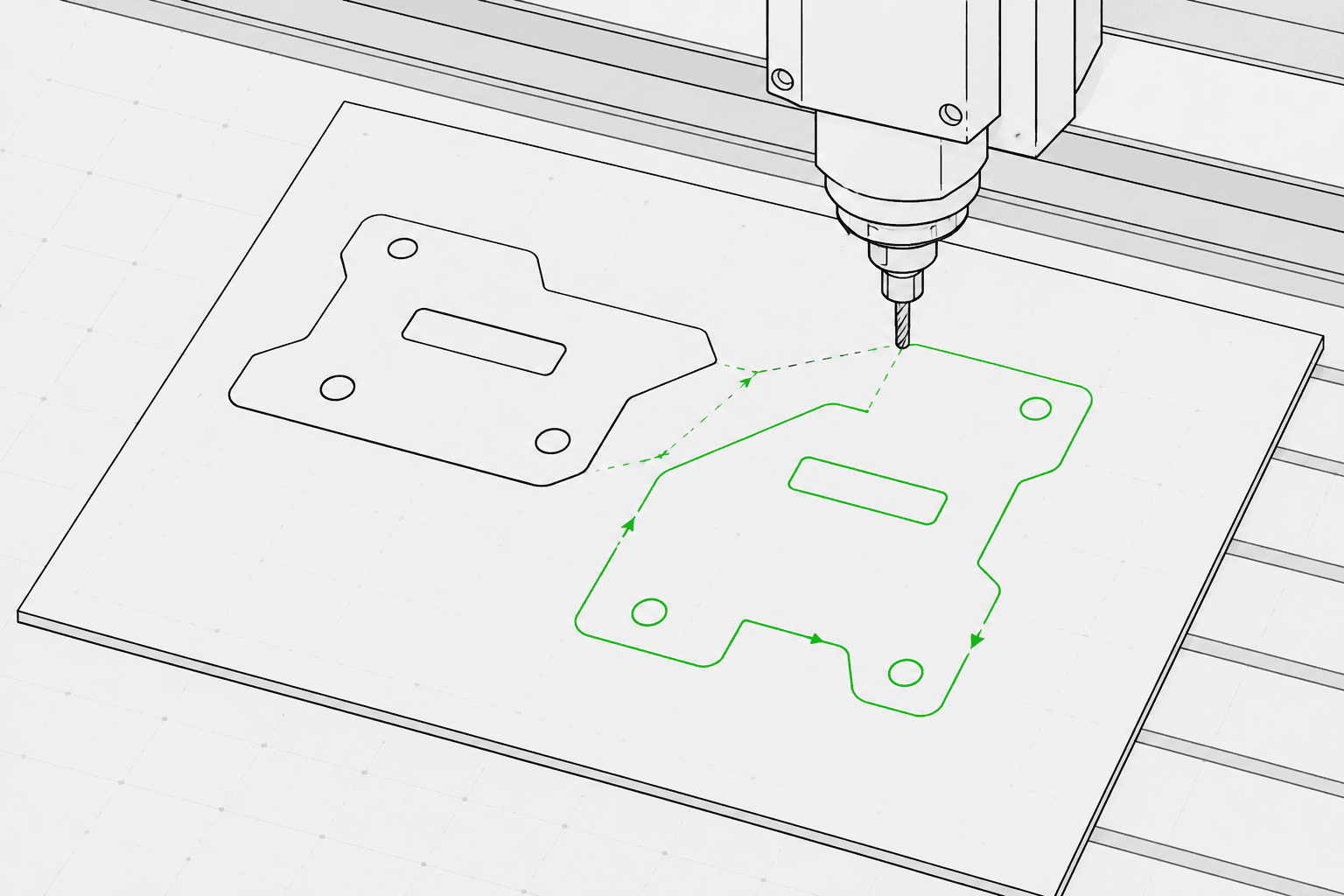
ก่อนสร้าง G-Code ระบบจะตรวจสอบ SVG ดังนี้ เรขาคณิตที่อยู่นอกพื้นที่ทำงานที่กำหนด เส้นทางแบบเปิดที่กำหนดเป้าหมายสำหรับการตัด และ SVG ที่ไม่มีเรขาคณิตเวกเตอร์ที่แปลงได้จะถูกบล็อกพร้อมข้อผิดพลาดเฉพาะ ข้อความสด รูปภาพที่ฝัง การไล่ระดับสี มาสก์ และเส้นทางคลิปจะสร้างคำเตือน โดยต้องทำให้เรียบในโปรแกรมแก้ไข SVG ก่อนอัปโหลด ผู้ใช้จะได้รับไฟล์ G-Code รายงาน JSON พร้อมขอบเขต การจับคู่การดำเนินการ สถิติเรขาคณิต และค่าตรวจสอบ รวมถึงตัวอย่างเส้นทางเครื่องมือแบบ SVG ที่แสดงการเคลื่อนที่แบบเดินทางเป็นเส้นประและเส้นทางการทำงานโดยระบายสีตามประเภทการดำเนินการ การดำเนินการของเราเตอร์ CNC เช่น การขุดพื้น ความลึก Z แท็บ lead-in และการชดเชยเครื่องมือ ไม่รวมอยู่ในบริการนี้
เตรียมงาน SVG เชิงเส้นที่สะอาดสำหรับเลเซอร์และพล็อตเตอร์ตามโปรไฟล์เครื่อง พร้อมการตรวจสอบ preflight ตัวอย่างผลลัพธ์ และรายงานการแปลงที่มีโครงสร้าง
เหมาะสมที่สุดสำหรับงานลายเส้น SVG ที่อิงเส้นทาง โลโก้ ป้ายกำกับ โครงร่าง และเรขาคณิตที่พร้อมสำหรับการวาด ควรทำให้ข้อความสด การไล่ระดับสี มาสก์ รูปภาพที่ฝัง และเอฟเฟกต์ที่ซับซ้อนเรียบก่อนอัปโหลด
เลือกการตั้งค่าเลเซอร์หรือพล็อตเตอร์ที่ใช้งานได้จริง เช่น โปรไฟล์เครื่อง ประเภทการดำเนินการ พื้นที่ทำงาน ความเร็ว กำลัง จำนวนรอบ และพฤติกรรมการเดินทาง
ตรวจจับฟีเจอร์ SVG ที่ไม่รองรับ อาร์ตเวิร์กที่เกินพื้นที่ ปัญหาขอบเขต เส้นทางแบบเปิด และปัญหาอื่น ๆ ก่อนสร้างผลลัพธ์สุดท้าย
ดาวน์โหลดไฟล์ .gcode ที่สร้างขึ้น พร้อมรายงานการแปลง JSON และตัวอย่างเส้นทางเครื่องมือแบบ SVG เพื่อตรวจสอบก่อนการตั้งค่าเครื่อง
มุ่งเน้นที่การแกะสลักด้วยเลเซอร์ การขีดคะแนน การตัดด้วยเลเซอร์ และเวิร์กโฟลว์การพล็อตด้วยปากกา ไม่รวมการดำเนินการ CNC CAM แบบครบถ้วน เช่น การขุดพื้น แท็บ ความลึก Z การชดเชยเครื่องมือ และเส้นทางเครื่องมือของเราเตอร์
G-Code สำหรับโปรไฟล์เลเซอร์ GRBL เลเซอร์ทั่วไป หรือพล็อตเตอร์ปากกา ใช้การเคลื่อนที่เชิงเส้น G0/G1 และคำสั่งกำลัง M3/M5 โดยไม่มีคำสั่งส่วนโค้ง G2/G3 เพื่อความเข้ากันได้กับคอนโทรลเลอร์ที่หลากหลาย
รายงาน JSON พร้อมสถานะ preflight ตัวบล็อก คำเตือน ขอบเขตเรขาคณิตในหน่วย mm สรุปการจับคู่การดำเนินการ จำนวนเส้นทาง จำนวนส่วน ระยะทางการเดินทางโดยประมาณ และค่าตรวจสอบ
SVG แบบสถิตที่แสดงพื้นที่ทำงานที่กำหนดค่า การเคลื่อนที่ของการเดินทาง (เส้นประ) และเส้นทางการทำงานที่ระบายสีตามการดำเนินการ โดยการตัดแสดงสีแดง การขีดคะแนนสีน้ำเงิน และการแกะสลักกับพล็อตสีดำ
ใช้อาร์ตเวิร์กเวกเตอร์ที่อิงเส้นทางซึ่งสะอาดเรียบร้อย และหลีกเลี่ยงฟีเจอร์ SVG ที่ไม่รองรับ เช่น รูปภาพแรสเตอร์ มาสก์ การไล่ระดับสี และข้อความที่ยังไม่ได้แปลง
เลือกโปรไฟล์เครื่อง (เลเซอร์ GRBL เลเซอร์ทั่วไป หรือพล็อตเตอร์ปากกา) ประเภทการดำเนินการ (แกะสลักเส้น ขีดคะแนน ตัด หรือพล็อต) ขนาดพื้นที่ทำงานในหน่วย mm ความเร็วป้อน ความเร็วเดินทาง เปอร์เซ็นต์กำลังเลเซอร์ และจำนวนรอบในแถบด้านข้างพื้นที่ทำงาน
ตรวจสอบตัวอย่างเส้นทางเครื่องมือและรายงาน จากนั้นดาวน์โหลดไฟล์ G-Code รายงาน JSON และตัวอย่างเส้นทางเครื่องมือแบบ SVG
แปลงอาร์ตเวิร์กโครงร่าง โลโก้ เครื่องประดับ และงานลายเส้น SVG ให้เป็น G-Code สำหรับการแกะสลักด้วยเลเซอร์
เตรียมการแปลงภาพลายเส้นเป็นเวกเตอร์ สำหรับเครื่องจักรสไตล์พล็อตเตอร์ที่การเดินทางและการวาดภาพมีความสำคัญ
ดำเนินการตรวจสอบ preflight และดูตัวอย่างเส้นทาง SVG ของคุณก่อนนำเข้าสู่ LightBurn, RDWorks หรือซอฟต์แวร์เลเซอร์ใดก็ตามที่รับไฟล์ SVG
สร้างเส้นทางเส้นที่ทำซ้ำได้สำหรับชื่อ ป้ายกำกับ ของขวัญชิ้นเล็ก และสินทรัพย์การผลิตที่มีแบรนด์
เตรียมงาน SVG เชิงเส้นที่มีการควบคุมสำหรับฉลาก แผ่นป้ายนำทาง และชิ้นงานแสดงผล
ค้นหาฟีเจอร์ SVG ที่ไม่รองรับและปัญหาขอบเขตพื้นที่ทำงานก่อนชำระเงินสำหรับผลลัพธ์ G-Code สุดท้าย
ไฟล์ SVG ที่ใช้เส้นทางที่สะอาดเรียบร้อยจะให้ผลลัพธ์ที่ดีที่สุด ควรหลีกเลี่ยงรูปภาพที่ฝัง ข้อความสด มาสก์ การไล่ระดับสี เส้นทางคลิป CSS ภายนอก และเอฟเฟกต์ที่ไม่รองรับ เว้นแต่จะถูกทำให้เรียบในโปรแกรมแก้ไขก่อน
ไม่มีซอฟต์แวร์ใดสามารถรับรองความปลอดภัยของเครื่องจักรทางกายภาพได้โดยไม่ทราบข้อมูลเครื่องจักร วัสดุ จุดกำเนิด โฟกัส และการตั้งค่าที่แน่นอน Pixel2Lines จัดเตรียม G-Code ตามโปรไฟล์เครื่อง การตรวจสอบ preflight คำเตือน และตัวอย่างผลลัพธ์ แต่ผู้ใช้มีหน้าที่ตรวจสอบการตั้งค่าเครื่องก่อนใช้งาน
ไม่ได้ บริการนี้มุ่งเน้นที่เวิร์กโฟลว์การแกะสลักเลเซอร์และพล็อตเตอร์เชิงเส้น ฟีเจอร์ของเราเตอร์ CNC เช่น การขุดพื้น แท็บ ความลึก Z lead-in และการชดเชยเครื่องมืออยู่นอกขอบเขตของบริการ
คุณจะได้รับไฟล์ G-Code รายงานการแปลง JSON ที่มีโครงสร้าง และตัวอย่างเส้นทางเครื่องมือแบบ SVG แบบสถิต
เลือก GRBL laser สำหรับเครื่องที่ใช้เฟิร์มแวร์ GRBL ซึ่งครอบคลุมเครื่องแกะสลักเลเซอร์ตั้งโต๊ะส่วนใหญ่ เลือก generic laser สำหรับคอนโทรลเลอร์ที่รับ G-Code มาตรฐานพร้อมคำสั่งเลเซอร์ M3/M5 แต่อาจไม่รองรับส่วนขยาย GRBL ทั้งหมด เลือก pen plotter สำหรับเครื่องวาดภาพที่ใช้กลไกเซอร์โวหรือ Z-axis เพื่อยกและวางปากกา จากนั้นเลือกเทมเพลตควบคุมปากกาที่เหมาะสม (เซอร์โว M3/M5 หรือ Z-axis lift) ตามฮาร์ดแวร์ของคุณ
