当前正在维护 - 注册将很快开放!

Pixel2Lines

服务
照片到 SVG 线稿
照片到 SVG 线稿
照片到 SVG 激光雕刻
照片到 SVG 激光雕刻
照片转 SVG 矢量化
照片转 SVG 矢量化
建筑插画
建筑插画
SVG→DXF
SVG to DXF
SVG→G-Code
SVG to G-Code
图像放大器
图像放大器
要删除背景的照片
要删除背景的照片
刺绣打版
刺绣打版
画廊定价SVG 编辑器
工作空间
  1. 首页/
  2. 服务/
  3. SVG to DXF Converter

SVG to DXF Converter

Production CAD-ready SVG to DXF workflow

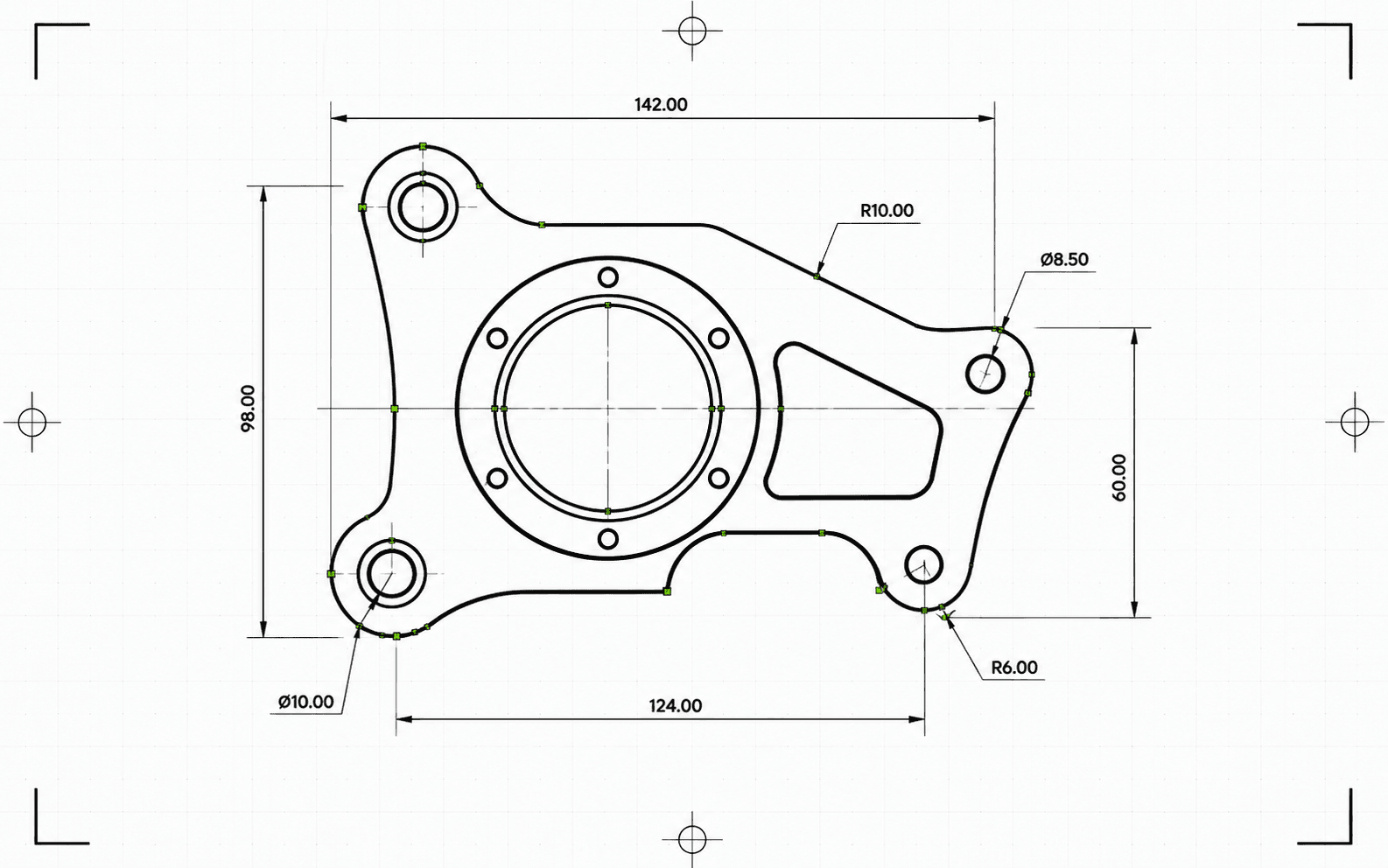
SVG line artwork prepared for DXF CAD export
...积分每次渲染

Pixel2Lines converts clean path-based SVG files into CAD-ready DXF output with strict feature blocking, dimensional checks, layer preservation, and entity-level validation. It is built for paid workflows where silent geometry loss is not acceptable.

The professional workflow returns the DXF file together with a structured JSON report covering blockers, warnings, dimensions, entity counts, cleanup actions, checksums, and delivery metadata. Unsupported SVG features must be flattened before conversion.

Professional SVG-to-DXF workflow

Create CAD-ready DXF output from clean SVG linework with strict validation, dimensional policy, and report-backed artifact delivery.

Clean SVG input

Best for path-based artwork, logos, labels, diagrams, and line drawings. Unsupported SVG effects are blocked unless flattened before upload.

Explicit dimensions

Physical units and reliable scaling are treated as production requirements. Ambiguous dimensions are surfaced before paid delivery.

CAD delivery validation

The engine checks write counts, finite extents, units, ezdxf audit results, entity consistency, and validation blockers before completing the job.

DXF plus report

Download the validated .dxf file and a JSON report containing status, warnings, blockers, entity counts, cleanup notes, byte sizes, and checksums.

Focused on trustworthy SVG-to-DXF geometry conversion. Raster images, live text, masks, filters, gradients, and complex visual effects must be flattened before upload unless explicitly supported by the engine.

Output artifacts

  • DXF

    DXF — CAD file

    Production DXF output for CAD, laser cutting, CNC layout, and vector archive handoff.

  • JSON

    JSON — Conversion report

    Structured preflight and delivery report with status, blockers, warnings, dimensions, entity counts, and artifact metadata.

How it works

  1. 1

    Upload a clean SVG

    Use path-based SVG artwork. Flatten live text, images, filters, masks, clip paths, gradients, and complex effects before upload.

  2. Arrow right
  3. 2

    Run production preflight

    The engine checks unsupported features, hidden geometry, dimensions, layers, cleanup actions, and CAD delivery constraints before writing DXF.

  4. Arrow right
  5. 3

    Download DXF and report

    Receive a validated DXF artifact and a structured report with checksums, byte sizes, entity counts, warnings, and blocking issues if conversion cannot be trusted.

立即获取积分并开始渲染

Best use cases

  • CAD handoff

    Prepare SVG logos, layouts, labels, line drawings, and diagrams for CAD applications that need DXF input.

    Open workspace
  • Laser cutting prep

    Convert clean vector paths into DXF while preserving practical layer semantics for cut, score, engrave, and detail workflows.

    Open workspace
  • CNC layout exchange

    Create a CAD exchange file for downstream CAM setup where geometry integrity and predictable units matter.

    Open workspace
  • Technical archive

    Store client artwork and production drawings in a CAD-friendly vector format with report-backed provenance.

    Open workspace
  • Layered production files

    Preserve meaningful SVG groups and production layer names where possible for cleaner CAD organization.

    Open workspace
  • SVG preflight

    Detect unsupported visual features, ambiguous dimensions, hidden content, and validation problems before paid delivery.

    Open workspace

常见问题

What SVG files work best?

Clean path-based SVG files work best. Flatten embedded images, live text, masks, filters, gradients, clip paths, external CSS, and unsupported effects before upload.

Will hidden SVG content become CAD geometry?

The production pipeline applies visibility rules for display, visibility, opacity, fill opacity, stroke opacity, stroke width, and hidden content so invisible artwork is not silently converted into DXF geometry.

How are SVG dimensions handled?

Explicit physical dimensions are preferred. Pixel-based dimensions use a documented DPI assumption, while ambiguous viewBox-only or percentage-only dimensions are blocked unless the workflow records a trusted scale policy.

What do I receive?

You receive a DXF file and a structured JSON conversion report with status, blockers, warnings, entity counts, validation details, artifact size, and checksum metadata.

Start SVG to DXF conversion in the workspace

专业流程服务


  • 照片到 SVG 线稿矢量
  • 照片到 SVG 激光雕刻矢量
  • SVG to G-Code矢量
  • 要删除背景的照片位图
  • 照片转 SVG 矢量化矢量
  • 照片到刺绣打版矢量
  • 建筑插画位图
  • 照片到设计网格位图
  • 画廊
  • 定价
  • 关于我们
  • 技术
  • 定制开发
  • 联系支持人员

转换工具


  • 文件转换器
  • JPG 转 PNG
  • JPG 转 WebP
  • JPG 转 AVIF
  • JPG 转 ICO
  • PNG 转 JPG
  • PNG 转 AVIF
  • PNG 转 WebP
  • PNG 转 ICO
  • WebP 转 JPG
  • WebP 转 PNG
  • WebP 转 AVIF
  • AVIF 转 JPG
  • AVIF 转 PNG
  • AVIF 转 WebP
  • SVG 转 PNG
  • SVG 转 JPG
  • SVG 转 WebP
  • SVG 转 AVIF
  • SVG 转 PDF高级
  • SVG 转 EPS高级
  • SVG 转 AI高级
  • SVG 转 DXF高级
  • PDF 转 PNG
  • BMP 转 PNG
  • DXF 转 SVG高级

指南


  • 有用的指南

Pixel2Lines

  • 法律
  • 隐私政策
  • 条款
  • Cookie