Saubere SVG-Eingabe
Geeignet für pfadbasierte Grafiken, Logos, Beschriftungen, Diagramme und Liniengrafik-Vektorisierung. Live-Text, Rasterbilder, Masken, Filter, Verläufe und komplexe Effekte sollten vor dem Hochladen reduziert werden.
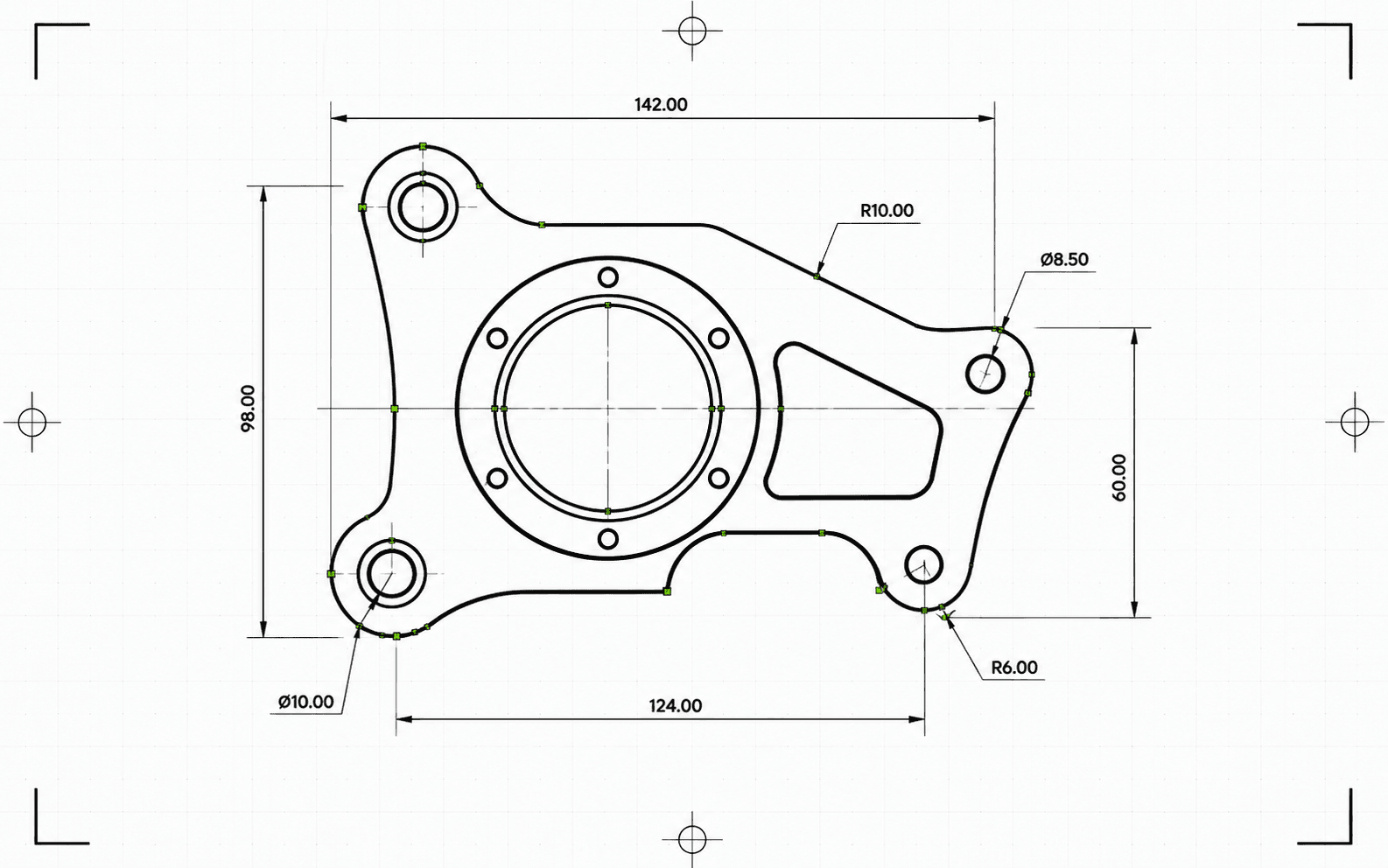
Pixel2Lines konvertiert pfadbasierte SVG-Dateien in DXF R2010 in Millimetern. Bezier-Kurven werden gegen eine Kreistoleranz geprüft und dort, wo die Anpassung zutrifft, als echte Arc-Entities geschrieben — anstatt sie zu Polylinien-Segmenten zu reduzieren. SVG-Farben werden DXF-Layern zugeordnet: rote Pfade zu Cut, blaue zu Score, grüne zu Engrave. Schwarze und achromatische Pfade werden standardmäßig Cut zugeordnet. Semantische Gruppen-IDs (CUT_HOLES, CUT_OUTER, DETAIL) werden als exakte DXF-Layer-Namen beibehalten. Die Geometrie wird vor dem Schreiben bereinigt: kurze Segmente, doppelte Entities und nahezu offene Pfade werden automatisch aufgelöst.
Vor der Konvertierung validiert die Pipeline die SVG-Datei: Live-Text blockiert den Auftrag mit einer spezifischen Fehlermeldung, und SVG-Dateien ohne explizite physische Abmessungen werden blockiert, anstatt stillschweigend skaliert zu werden. Verläufe, Masken, Filter und Clip-Pfade werden mit Warnungen übersprungen — sie müssen zuvor in Ihrem SVG-Editor reduziert werden. Sie erhalten eine DXF-Datei und einen JSON-Bericht mit Status, Blockierern, Warnungen, bestätigten Abmessungen, Entity-Anzahl pro Layer, durchgeführten Bereinigungsaktionen, Artefaktgröße und Prüfsummen.
Pfadbasierte SVG-Dateien in DXF R2010 in Millimetern konvertieren — mit verifiziertem Maßstab, Arc-genauer Geometrie und einem JSON-Bericht für jede Konvertierung.
Geeignet für pfadbasierte Grafiken, Logos, Beschriftungen, Diagramme und Liniengrafik-Vektorisierung. Live-Text, Rasterbilder, Masken, Filter, Verläufe und komplexe Effekte sollten vor dem Hochladen reduziert werden.
Physische Abmessungen werden als Voraussetzung behandelt. SVG-Dateien mit expliziten Breiten- und Höhenangaben in mm, cm oder Zoll werden in ihrer angegebenen Größe konvertiert. SVG-Dateien mit ausschließlich ViewBox ohne physische Einheiten werden blockiert — die DXF-Datei wird nicht in einem nicht verifizierten Maßstab erzeugt. Die Ausgabe-DXF deklariert Millimeter in ihrem Header ($INSUNITS=4).
Bezier-Kurven werden mit einem 5-Punkt-Sample bei 0,01 mm Toleranz gegen einen Kreis angepasst. Kurven, die bestanden werden, werden als ARC-Entities geschrieben; Kurven, die nicht bestanden werden, werden mit derselben Toleranz als Linien-Segmente angenähert. Nach dem Schreiben wird die DXF-Datei validiert: Einheiten-Header, endliche Ausdehnung, Entity-Anzahl und Koordinatengültigkeit. Die Ausgabe ist im R2010-Format und kann von AutoCAD, LightBurn, RDWorks, Fusion 360 und Standard-CAM-Software gelesen werden.
Laden Sie die validierte DXF-Datei und einen JSON-Bericht mit Status, Warnungen, Blockierern, Abmessungen, Layer-Zuordnungen, Entity-Anzahl, Bereinigungshinweisen, Byte-Größen und Prüfsummen herunter. Entities in der DXF-Datei sind für das Schneiden geordnet: Innenformen vor Außenkonturen, damit innere Ausschnitte abgeschlossen werden, bevor das umgebende Material freigegeben wird.
Fokussiert auf zuverlässige 2D-SVG-zu-DXF-Geometriekonvertierung für CAD, Laser-Software und CAM-Übergabe. Rasterbilder, Live-Text, Masken, Filter, Verläufe und komplexe visuelle Effekte müssen zuvor reduziert werden. CNC-Werkzeugpfadgenerierung und Fräser-CAM-Operationen sind nicht enthalten.
DXF R2010-Ausgabe in Millimetern für CAD-Import, Laser-Software, CAM-Übergabe und Vektorarchivierung.
Strukturierter Preflight- und Lieferbericht mit Status, Blockierern, Warnungen, Abmessungen, Layern, Entity-Anzahl, Bereinigungsaktionen und Prüfsummen.
Verwenden Sie eine pfadbasierte SVG-Datei mit echter Vektorgeometrie. Konvertieren Sie Live-Text in Konturen und reduzieren Sie eingebettete Bilder, Masken, Filter, Clip-Pfade, Verläufe und andere visuelle Effekte vor dem Hochladen.
Der Konverter prüft nicht unterstützte SVG-Funktionen, transparente oder unsichtbare Geometrie und fehlende physische Abmessungen. Aufträge, die unzuverlässige Ausgaben erzeugen würden, werden mit einer spezifischen Fehlermeldung blockiert, bevor die DXF-Datei geschrieben wird.
Laden Sie eine validierte DXF R2010-Datei und einen JSON-Bericht mit Prüfsummen, Byte-Größen und Entity-Anzahl herunter. Warnungen und Blocker sind im Bericht enthalten, wenn während der Konvertierung Probleme erkannt wurden.
Bereiten Sie SVG-Logos, Layouts, Beschriftungen, Zeichnungen und Diagramme für CAD-Anwendungen vor, die eine DXF-Eingabe benötigen.
Konvertieren Sie saubere Vektorpfade in DXF mit den Layern Cut, Score, Engrave oder semantischen Produktionslayern, sofern die SVG-Datei dies unterstützt.
Erstellen Sie eine DXF-Austauschdatei für die nachgelagerte CAD/CAM-Einrichtung. Werkzeugpfade, Z-Tiefe, Stege, Taschen und Fräserkorrektur verbleiben in der CAM-Software.
Speichern Sie Kundenvorlagen und Produktionszeichnungen in einem CAD-freundlichen Vektorformat mit berichtsgestützter Herkunft.
Verwenden Sie Farben und unterstützte Gruppen-Semantik, um DXF-Layer wie Cut, Score, Engrave, CUT_HOLES, CUT_OUTER und DETAIL zu organisieren.
Führen Sie eine Probekonvertierung durch, um nicht unterstützte Funktionen, mehrdeutige Abmessungen und Geometrieprobleme zu erkennen, bevor Sie eine vollständige Konvertierung starten.
Am besten funktionieren saubere, pfadbasierte SVG-Dateien. Reduzieren Sie eingebettete Bilder, Live-Text, Masken, Filter, Verläufe, Clip-Pfade, externes CSS und nicht unterstützte Effekte vor dem Hochladen.
Die Ausgabe verwendet LINE-, ARC-, CIRCLE- und LWPOLYLINE-Entities — die Typen, die von AutoCAD, LightBurn, RDWorks, Fusion 360 und den meisten Laser-Controllern unterstützt werden. Es werden keine SPLINE-Entities geschrieben, was die Kompatibilität mit älteren Maschinen-Controllern sicherstellt. Bezier-Kurven, die einer Kreisform innerhalb von 0,01 mm entsprechen, werden als ARC-Entities geschrieben; andere werden als Linien-Segmente mit derselben Toleranz angenähert. Vollständige Kreise werden erkannt und als CIRCLE-Entities geschrieben.
SVG-Dateien mit expliziten Breiten- und Höhenangaben in mm, cm oder Zoll werden in ihren angegebenen Abmessungen konvertiert. Pixelbasierte SVG-Dateien verwenden standardmäßig 96 DPI. SVG-Dateien mit ausschließlich ViewBox ohne explizite physische Einheiten werden blockiert — die DXF-Datei wird nicht in einem nicht verifizierten Maßstab geliefert.
Sie erhalten eine DXF-Datei und einen strukturierten JSON-Konvertierungsbericht mit Status, Blockierern, Warnungen, Abmessungen, Entity- und Layer-Anzahl, Validierungsdetails, Artefaktgrößen und Prüfsummen. CNC-Fräser-Werkzeugpfade, Z-Tiefe, Stege, Taschen, Einleitungen, Vorschübe, Geschwindigkeiten und Fräserkorrektur verbleiben in der CAM-Software.
