Masukan SVG yang bersih
Paling cocok untuk Vektorisasi Grafik Garis berbasis jalur, logo, label, outline, dan geometri siap gambar. Ratakan teks langsung, gradien, masker, gambar tersemat, dan efek kompleks sebelum mengunggah.
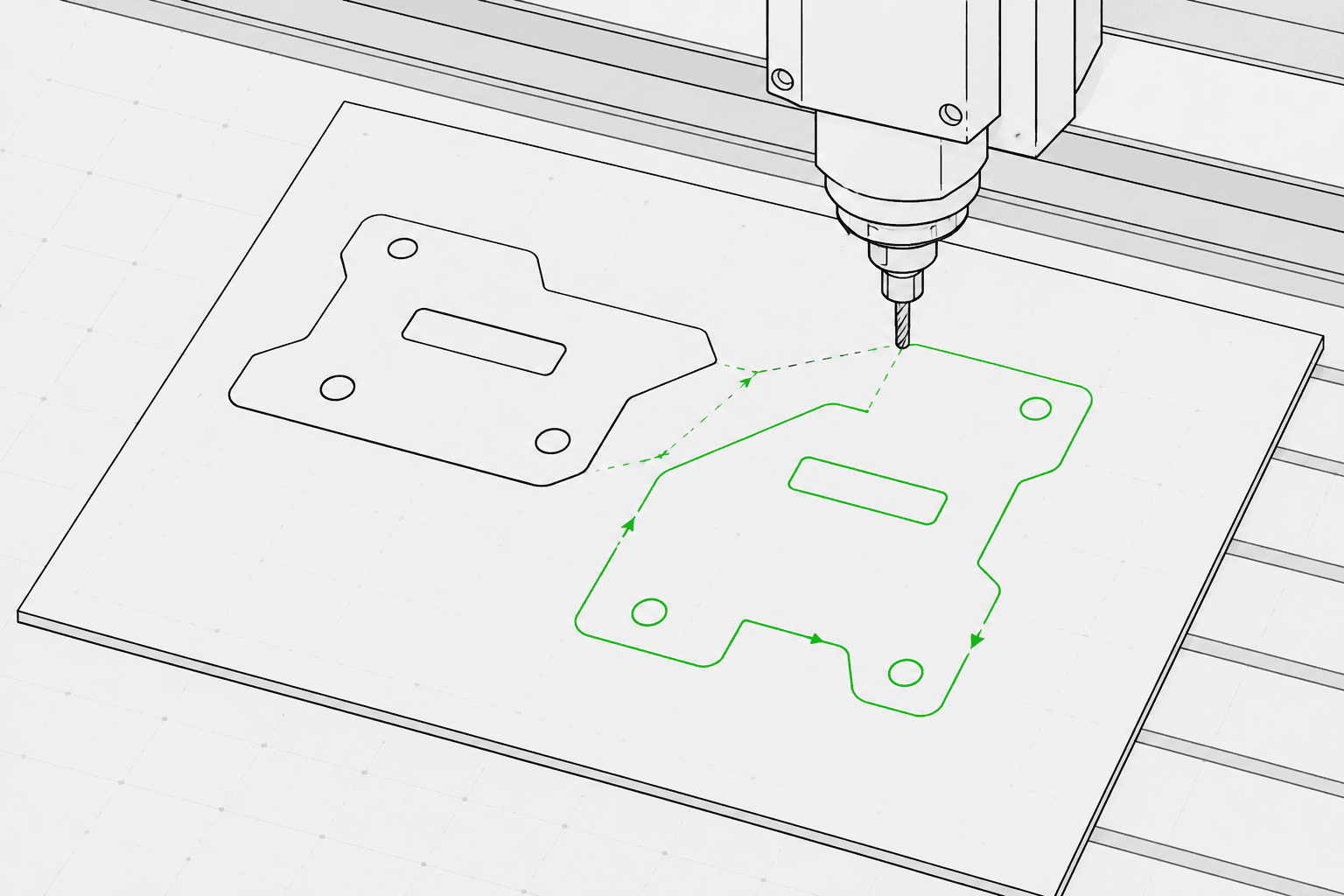
Pixel2Lines mengonversi file SVG berbasis jalur menjadi G-Code untuk tiga profil mesin: laser GRBL, laser generik, dan pen plotter. Keluaran menggunakan gerakan cepat G0 dan gerakan pemakanan G1 — perintah M3 dan M5 mengontrol daya laser melalui parameter S (0–1000), atau posisi pena melalui templat yang dapat dikonfigurasi. Anda menentukan maksud operasi (ukir garis, skor, potong, atau plot), dimensi area kerja dalam mm, kecepatan pemakanan, kecepatan lintasan, persentase daya laser, dan jumlah lintasan. Kurva Bezier dan busur dikonversi menjadi segmen poligaris pada toleransi yang dapat dikonfigurasi — tidak ada perintah busur G2/G3 yang dihasilkan, sehingga keluaran tetap kompatibel dengan kontroler dasar dan lama.
Sebelum menghasilkan G-Code, pipeline memvalidasi SVG: geometri di luar area kerja yang dikonfigurasi, jalur terbuka yang ditargetkan untuk operasi potong, dan SVG tanpa geometri vektor yang dapat dikonversi akan diblokir dengan kesalahan spesifik. Teks langsung, gambar tersemat, gradien, masker, dan jalur klip menghasilkan peringatan — elemen-elemen ini harus diratakan di editor SVG Anda sebelum diunggah. Anda menerima file G-Code, laporan JSON yang berisi batas, pemetaan operasi, statistik geometri, dan checksum, serta pratinjau jalur pahat SVG yang menampilkan gerakan lintasan sebagai garis putus-putus dan jalur kerja yang diberi kode warna berdasarkan jenis operasi. Operasi router CNC — pocketing, kedalaman Z, tab, lead-in, dan kompensasi alat — tidak disertakan.
Konversi file SVG berbasis jalur ke G-Code untuk profil laser GRBL, laser generik, dan pen plotter dengan validasi preflight, laporan JSON, dan pratinjau jalur pahat SVG untuk setiap konversi.
Paling cocok untuk Vektorisasi Grafik Garis berbasis jalur, logo, label, outline, dan geometri siap gambar. Ratakan teks langsung, gradien, masker, gambar tersemat, dan efek kompleks sebelum mengunggah.
Pilih profil mesin (laser GRBL, laser generik, atau pen plotter), maksud operasi (ukir garis, skor, potong, atau plot), lebar dan tinggi area kerja dalam mm, kecepatan pemakanan (mm/min), kecepatan lintasan (mm/min), daya laser (0–100%), dan jumlah lintasan (1–20). Pemetaan warna SVG ke operasi bersifat opsional: jalur biru dipetakan ke skor, hijau ke ukir, dan merah ke potong saat diaktifkan.
Pipeline memblokir pekerjaan dengan geometri di luar area kerja yang dikonfigurasi, jalur terbuka yang ditargetkan untuk operasi potong, dan SVG tanpa geometri vektor yang dapat dikonversi. Teks langsung, gambar tersemat, gradien, masker, filter, dan jalur klip menghasilkan peringatan — elemen-elemen ini harus diratakan sebelum diunggah.
Unduh file G-Code, laporan JSON yang berisi batas, pemetaan operasi, statistik geometri, dan checksum, serta pratinjau jalur pahat SVG. Pratinjau menampilkan batas area kerja, gerakan lintasan sebagai garis putus-putus, dan jalur kerja yang diberi kode warna berdasarkan jenis operasi. Keamanan mesin — titik asal, fokus, material, kecepatan, dan daya yang benar — tetap menjadi tanggung jawab operator.
Berfokus pada pengukiran laser, penskoran, pemotongan ringan, dan alur kerja garis pen plotter. Operasi CNC CAM penuh seperti pocketing, tab, kedalaman Z, kompensasi alat, dan jalur pahat router tidak disertakan.
G-Code untuk profil laser GRBL, laser generik, atau pen plotter. Menggunakan gerakan linier G0/G1 dan perintah daya M3/M5. Tidak ada perintah busur (G2/G3) demi kompatibilitas kontroler yang lebih luas.
Laporan JSON yang berisi status preflight, pemblokir, peringatan, batas geometri dalam mm, ringkasan pemetaan operasi, jumlah jalur, jumlah segmen, estimasi jarak lintasan, dan checksum.
SVG statis yang menampilkan area kerja yang dikonfigurasi, gerakan lintasan (garis putus-putus), dan jalur kerja yang diberi kode warna berdasarkan operasi: potong dalam merah, skor dalam biru, ukir dan plot dalam hitam.
Gunakan karya seni vektor berbasis jalur yang bersih dan hindari fitur SVG yang tidak didukung seperti gambar raster, masker, gradien, dan teks yang belum dikonversi ke outline.
Pilih profil mesin (laser GRBL, laser generik, atau pen plotter), maksud operasi (ukir, skor, potong, atau plot), dimensi area kerja dalam mm, kecepatan pemakanan, kecepatan lintasan, persentase daya laser, dan jumlah lintasan di panel samping ruang kerja.
Periksa pratinjau jalur pahat dan laporan, lalu unduh file G-Code, laporan JSON, dan pratinjau jalur pahat SVG.
Konversi karya seni outline, logo, ornamen, dan Vektorisasi Grafik Garis menjadi G-Code pengukiran laser.
Konversi Vektorisasi Grafik Garis ke G-Code untuk mesin pen plotter dengan kontrol pena naik/turun melalui servo (M3/M5) atau templat Z-axis lift.
Jalankan pemeriksaan preflight dan pratinjau jalur pahat SVG Anda sebelum mengimpor ke LightBurn, RDWorks, atau perangkat lunak laser apa pun yang menerima input SVG.
Hasilkan jalur garis yang dapat diulang untuk nama, label, hadiah kecil, dan aset produksi bermerek.
Siapkan linework SVG yang terkontrol untuk label, pelat, tanda arah, dan bagian display.
Jalankan pemeriksaan preflight untuk mendeteksi fitur SVG yang tidak didukung, geometri di luar area kerja, dan jalur terbuka sebelum memulai konversi G-Code penuh.
File SVG berbasis jalur yang bersih bekerja paling baik. Konversi teks langsung menjadi outline dan ratakan gambar tersemat, masker, gradien, jalur klip, dan efek visual sebelum mengunggah. SVG dengan dimensi fisik eksplisit (mm, cm, atau inci) dikonversi pada ukuran yang dideklarasikan; SVG berbasis piksel menggunakan 96 DPI secara bawaan.
Tidak ada perangkat lunak yang dapat menjamin keamanan fisik mesin tanpa mengetahui mesin, material, titik asal, fokus, dan pengaturan yang tepat. Pixel2Lines menyediakan G-Code berprofil mesin, pemeriksaan preflight, peringatan, dan pratinjau, namun pengguna wajib memverifikasi pengaturan mesin sebelum menjalankannya.
Tidak. Layanan ini berfokus pada pengukiran garis laser, penskoran, pemotongan ringan, dan alur kerja pen plotter. Operasi router CNC — pocketing, tab, kedalaman Z, lead-in, dan kompensasi alat — tidak disertakan.
Anda menerima file G-Code yang dikonfigurasi untuk profil mesin yang dipilih, laporan JSON yang berisi status preflight, pemblokir, peringatan, batas geometri dalam mm, pemetaan operasi, jumlah jalur, dan checksum, serta pratinjau jalur pahat SVG statis yang menampilkan gerakan lintasan dan jalur kerja untuk inspeksi visual sebelum menjalankan mesin.
Pilih laser GRBL untuk mesin yang menjalankan firmware GRBL — ini mencakup sebagian besar laser engraver desktop. Pilih laser generik untuk kontroler yang menerima G-Code standar dengan perintah laser M3/M5 tetapi mungkin tidak mendukung semua ekstensi GRBL. Pilih pen plotter untuk mesin gambar yang menggunakan servo atau mekanisme Z-axis untuk mengangkat dan menurunkan pena — lalu pilih templat kontrol pena yang sesuai (servo M3/M5 atau Z-axis lift) untuk perangkat keras Anda.
