Derzeit in Wartung - Die Registrierung ist bald wieder möglich!

Pixel2Lines

Leistungen
Foto zu SVG Zeichnung
Foto zu SVG Lasergravur
Foto zu SVG-Vektorisierung
Architektur-Illustration
SVG→DXF
SVG to DXF
SVG→G-Code
SVG to G-Code
Bild-Upscaler
Bild-Upscaler
Foto Hintergrund entfernen
Stickdatei erstellen
GaleriePreiseSVG-Editor
Arbeitsbereich
  1. Startseite/
  2. Service/
  3. SVG-zu-G-Code-Konverter

SVG-zu-G-Code-Konverter

Maschinenprofilierter SVG-zu-G-Code-Workflow

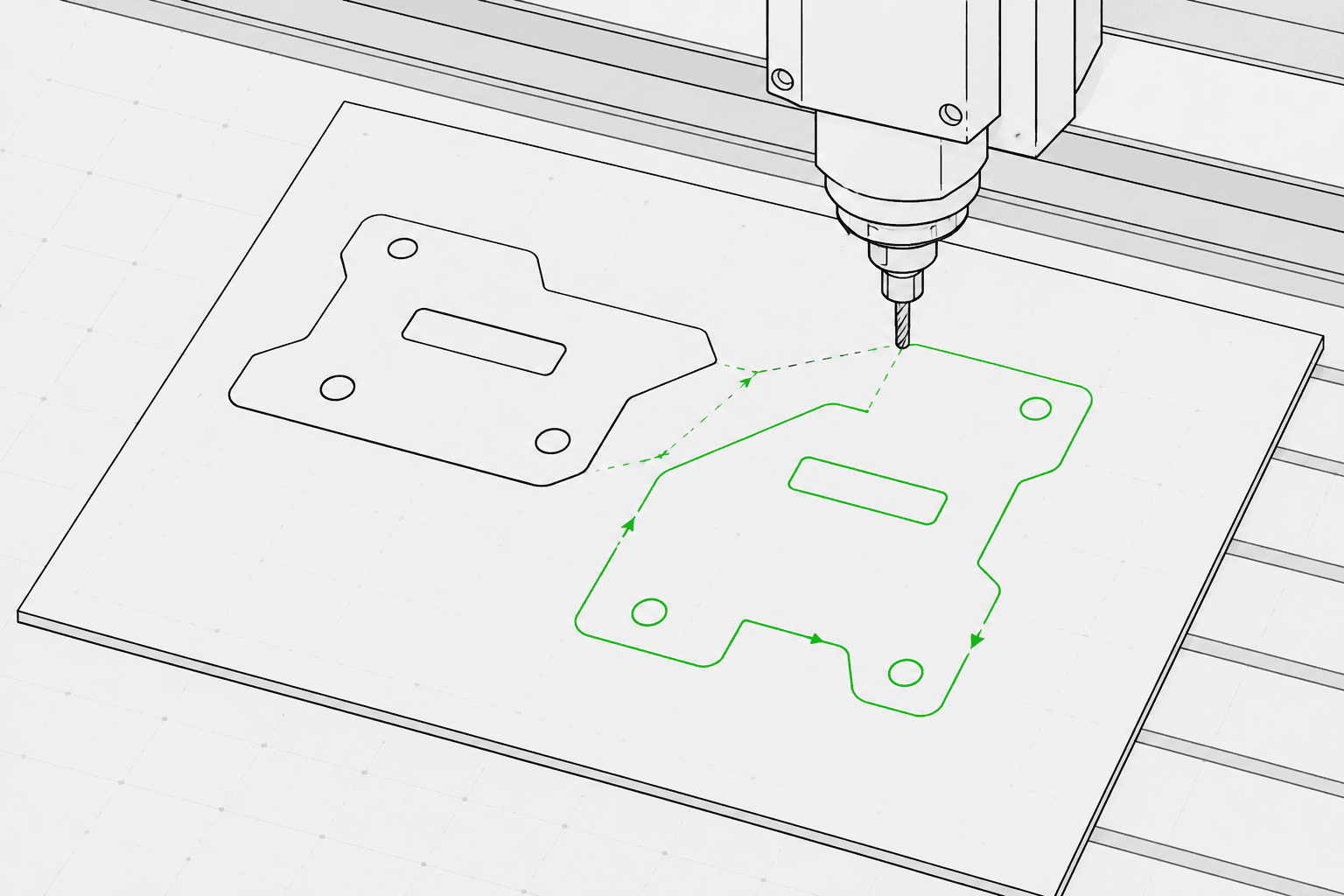
SVG line artwork prepared for G-Code laser engraving
...Creditspro Rendering

Pixel2Lines turns path-based SVG files into machine-profiled G-Code with profile settings, work-area checks, and a static toolpath preview. It is built for users who need predictable laser or plotter motion before machine setup.

The advanced workflow includes SVG preflight, operation intent, bounds validation, generated G-Code, a JSON report, and a preview artifact. It is focused on laser and plotter line workflows, not full CNC router CAM.

Professional SVG-to-G-Code workflow

Prepare clean SVG linework for machine-profiled laser and plotter output with preflight checks, a preview, and a structured conversion report.

Clean SVG input

Best for path-based line art, logos, labels, outlines, and drawings. Flatten live text, gradients, masks, embedded images, and complex effects before upload.

Machine-aware settings

Choose practical laser or plotter settings such as machine profile, job type, work area, speed, power, passes, and return behavior.

Preflight checks

Catch unsupported SVG features, oversized artwork, bounds problems, open cut paths, and other issues before final generation where possible.

G-Code plus proof

Download the generated .gcode file with a JSON conversion report and an SVG toolpath preview for review before machine setup.

Focused on laser engraving, scoring, light cutting, and pen plotter line workflows. Full CNC CAM operations such as pocketing, tabs, Z-depth, tool compensation, and router toolpaths are not included.

Output artifacts

  • GCODE

    GCODE — Machine file

    Machine-profiled G-Code for the selected laser or plotter workflow.

  • JSON

    JSON — Conversion report

    Structured preflight details for warnings, bounds, profile, operations, and generated artifacts.

  • SVG

    SVG — Toolpath preview

    Static SVG preview showing the generated movement path before running the machine file.

How it works

  1. 1

    Upload an SVG

    Use clean path-based vector artwork and avoid unsupported SVG features such as raster images, masks, gradients, and unresolved text.

  2. Arrow right
  3. 2

    Set the machine intent

    Choose the machine profile, operation intent, work area, feed rate, and output settings in the workspace sidebar.

  4. Arrow right
  5. 3

    Review and download

    Check the toolpath preview and report, then download the generated G-Code and supporting artifacts.

Jetzt Guthaben erhalten und mit dem Rendern beginnen

Best use cases

  • Laser line engraving

    Convert outline artwork, logos, ornaments, and line drawings into laser engraving G-Code.

    Open workspace
  • Pen plotting

    Prepare simple SVG line drawings for plotter-style machines where travel and draw moves matter.

    Open workspace
  • Laser workflow handoff

    Use a machine-profiled handoff when an SVG needs preflight checks, profile settings, and a toolpath preview before laser setup.

    Read guide
  • Product personalization

    Generate repeatable line paths for names, labels, small gifts, and branded production assets.

    Open workspace
  • Signs and plaques

    Prepare controlled SVG linework for labels, plates, directional signs, and display pieces.

    Open workspace
  • SVG preflight

    Find unsupported SVG features and work-area problems before paying for final G-Code output.

    Open workspace

FAQ

What SVG files work best?

Clean path-based SVG files work best. Avoid embedded images, live text, masks, gradients, clip paths, external CSS, and unsupported effects unless they are flattened first.

Is the G-Code guaranteed safe for my machine?

No software can guarantee physical machine safety without the exact machine, material, origin, focus, and setup. Pixel2Lines provides machine-profiled G-Code, preflight checks, warnings, and a preview, but the user must verify the machine setup before running it.

Does this replace full CNC CAM software?

No. This service focuses on laser and plotter-style line workflows. CNC router features such as pocketing, tabs, Z-depth, lead-ins, and tool compensation are out of scope for V1.

What do I receive?

You receive a G-Code file, a structured JSON conversion report, and a static SVG toolpath preview.

Start SVG to G-Code conversion in the workspace

Workflow-Dienste


  • Foto zu SVG-ZeichnungVektor
  • Foto zu SVG-LasergravurVektor
  • SVG to G-CodeVektor
  • Foto Hintergrund entfernenRaster
  • Foto zu SVG-VektorisierungVektor
  • Stickdatei erstellenVektor
  • Architektur-IllustrationRaster
  • Foto zu Design-GridRaster
  • Galerie
  • Preise
  • Über uns
  • Technologie
  • Individuelle Entwicklung
  • Support kontaktieren

Konvertierungstools


  • Dateikonverter
  • JPG zu PNG
  • JPG zu WEBP
  • JPG zu AVIF
  • JPG zu ICO
  • PNG zu JPG
  • PNG zu AVIF
  • PNG zu WEBP
  • PNG zu ICO
  • WEBP zu JPG
  • WEBP zu PNG
  • WEBP zu AVIF
  • AVIF zu JPG
  • AVIF zu PNG
  • AVIF zu WEBP
  • SVG zu PNG
  • SVG zu JPG
  • SVG zu WEBP
  • SVG zu AVIF
  • SVG zu PDFPremium
  • SVG zu EPSPremium
  • SVG zu AIPremium
  • SVG zu DXFPremium
  • PDF zu PNG
  • BMP zu PNG
  • DXF zu SVGPremium

Anleitungen


  • Hilfreiche Guides

Pixel2Lines

  • Rechtliches
  • Datenschutz
  • AGB
  • Kekse