Clean SVG input
Best for path-based line-graphic SVG, logos, labels, outlines, and drawing-ready geometry. Flatten live text, gradients, masks, embedded images, and complex effects before upload.
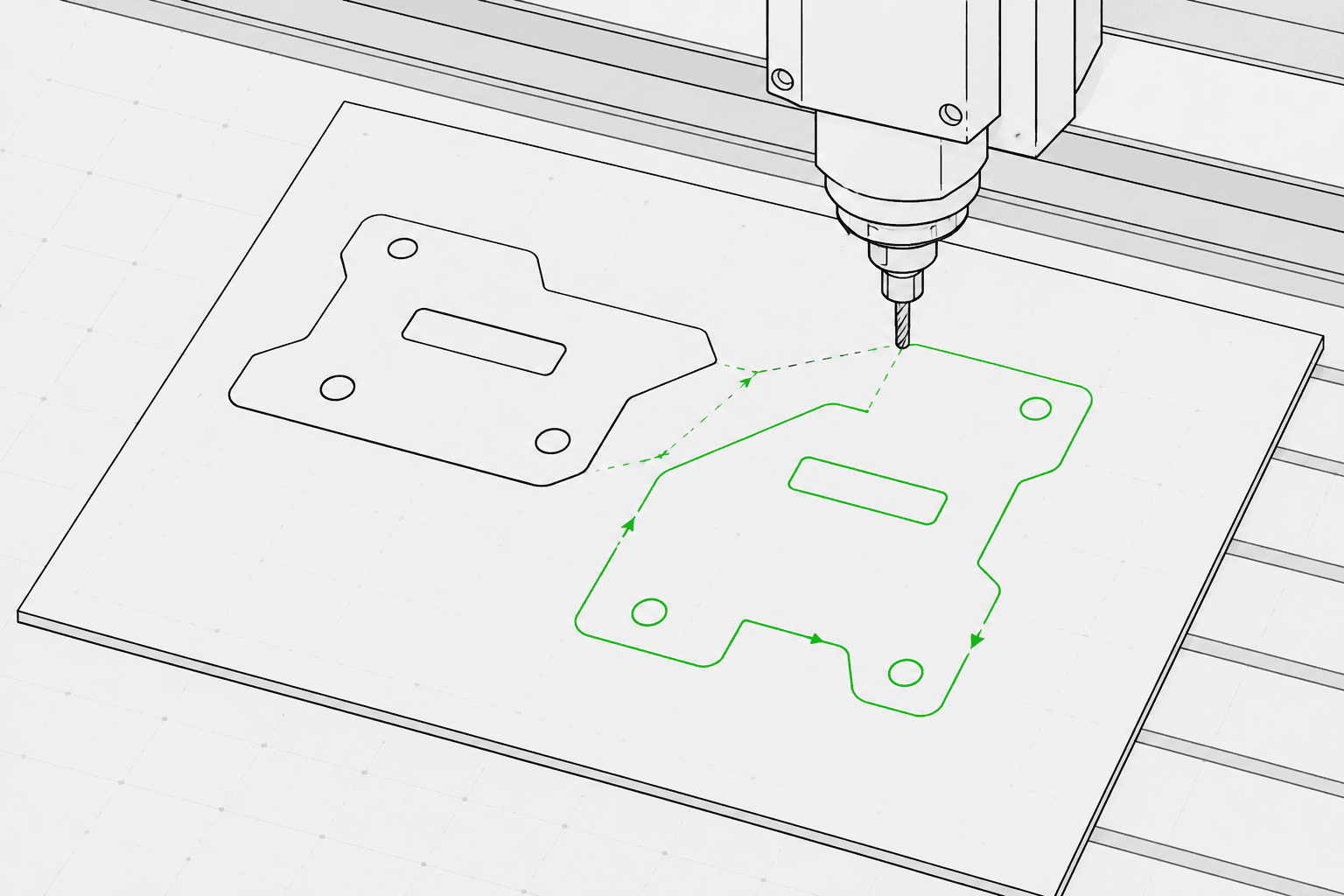
Pixel2Lines converts path-based SVG files to G-Code for three machine profiles: GRBL laser, generic laser, and pen plotter. The output uses G0 rapid moves and G1 feed moves — M3 and M5 commands control laser power via the S parameter (0–1000), or pen position via configurable templates. You set the operation intent (line engrave, score, cut, or plot), work area dimensions in mm, feed rate, travel rate, laser power percentage, and pass count. Bezier curves and arcs are converted to polyline segments at a configurable tolerance — no G2/G3 arc commands are emitted, which keeps the output compatible with basic and older controllers.
Before generating G-Code, the pipeline validates the SVG: geometry outside the configured work area, open paths targeted for cut operations, and SVGs with no convertible vector geometry are blocked with a specific error. Live text, embedded images, gradients, masks, and clip paths produce warnings — these must be flattened in your SVG editor before upload. You receive a G-Code file, a JSON report with bounds, operation mapping, geometry statistics, and checksums, and an SVG toolpath preview showing travel moves as dashed lines and work paths color-coded by operation type. CNC router operations — pocketing, Z-depth, tabs, lead-ins, and tool compensation — are not included.
Convert path-based SVG files to G-Code for GRBL laser, generic laser, and pen plotter profiles with preflight validation, a JSON report, and an SVG toolpath preview for every conversion.
Best for path-based line-graphic SVG, logos, labels, outlines, and drawing-ready geometry. Flatten live text, gradients, masks, embedded images, and complex effects before upload.
Select machine profile (GRBL laser, generic laser, or pen plotter), operation intent (line engrave, score, cut, or plot), work area width and height in mm, feed rate (mm/min), travel rate (mm/min), laser power (0–100%), and pass count (1–20). SVG color-to-operation mapping is opt-in: blue paths map to score, green to engrave, and red to cut when enabled.
The pipeline blocks jobs with geometry outside the configured work area, open paths targeted for cut operations, and SVGs with no convertible vector geometry. Live text, embedded images, gradients, masks, filters, and clip paths produce warnings — these elements must be flattened before upload.
Download the G-Code file, a JSON report with bounds, operation mapping, geometry statistics, and checksums, and an SVG toolpath preview. The preview shows the work area boundary, travel moves as dashed lines, and work paths color-coded by operation type. Machine safety — correct origin, focus, material, speed, and power — remains the operator's responsibility.
Focused on laser engraving, scoring, light cutting, and pen plotter line workflows. Full CNC CAM operations such as pocketing, tabs, Z-depth, tool compensation, and router toolpaths are not included.
G-Code for GRBL laser, generic laser, or pen plotter profiles. Uses G0/G1 linear moves and M3/M5 power commands. No arc commands (G2/G3) for broad controller compatibility.
JSON report with preflight status, blockers, warnings, geometry bounds in mm, operation mapping summary, path count, segment count, estimated travel distance, and checksums.
Static SVG showing the configured work area, travel moves (dashed), and work paths color-coded by operation: cut in red, score in blue, engrave and plot in black.
Use clean path-based vector artwork and avoid unsupported SVG features such as raster images, masks, gradients, and unresolved text.
Select a machine profile (GRBL laser, generic laser, or pen plotter), operation intent (engrave, score, cut, or plot), work area dimensions in mm, feed rate, travel rate, laser power percentage, and pass count in the workspace sidebar.
Check the toolpath preview and report, then download the G-Code file, JSON report, and SVG toolpath preview.
Convert outline artwork, logos, ornaments, and line-graphic SVG into laser engraving G-Code.
Convert line-graphic SVG to G-Code for pen plotter machines with pen up/down control via servo (M3/M5) or Z-axis lift templates.
Run a preflight check and preview your SVG toolpaths before importing into LightBurn, RDWorks, or any laser software that accepts SVG input.
Generate repeatable line paths for names, labels, small gifts, and branded production assets.
Prepare controlled SVG linework for labels, plates, directional signs, and display pieces.
Run a preflight check to detect unsupported SVG features, geometry outside the work area, and open paths before starting a full G-Code conversion.
Clean path-based SVG files work best. Convert live text to outlines and flatten embedded images, masks, gradients, clip paths, and visual effects before upload. SVGs with explicit physical dimensions (mm, cm, or inches) are converted at declared size; pixel-based SVGs use 96 DPI by default.
No software can guarantee physical machine safety without the exact machine, material, origin, focus, and setup. Pixel2Lines provides machine-profiled G-Code, preflight checks, warnings, and a preview, but the user must verify the machine setup before running it.
No. This service is focused on laser line engraving, scoring, light cutting, and pen plotter workflows. CNC router operations — pocketing, tabs, Z-depth, lead-ins, and tool compensation — are not included.
You receive a G-Code file configured for the selected machine profile, a JSON report with preflight status, blockers, warnings, geometry bounds in mm, operation mapping, path counts, and checksums, and a static SVG toolpath preview showing travel moves and work paths for visual inspection before running the machine.
Choose GRBL laser for machines running GRBL firmware — this covers most desktop laser engravers. Choose generic laser for controllers that accept standard G-Code with M3/M5 laser commands but may not support all GRBL extensions. Choose pen plotter for drawing machines that use a servo or Z-axis mechanism to lift and lower a pen — then select the matching pen control template (servo M3/M5 or Z-axis lift) for your hardware.
